
VDWall LVP615S LED HD Video Processor
2× Video · YPbPr · 2× VGA · DP · DVI · HDMI · SDI in with loop · seamless switching · DVI loop cascade
The LVP615S is VDWall’s HD video processor for LED walls: it accepts composite video, YPbPr, VGA, DisplayPort, DVI, HDMI and SDI, switches and scales them without a visible cut, and feeds the LED lattice through its own built-in sending cards or a cascaded DVI loop — supplied by Excelled, an LED video processor and display supplier for global B2B system integrators.

VDWall LVP615S LED HD Video Processor at a Glance
What is it? The LVP615S is a professional HD LED video processor from the VDWall LVP615 series — a 10+ bit Faroudja® Real Color® processing platform that sits between the source rack and the LED wall, supplied factory-direct by Excelled Display.
What can it take in? 2× Video, 1× YPbPr, 2× VGA (VESA), 1× DP (VESA), 1× DVI (VESA), 1× HDMI (VESA/CEA-861) and 1× SDI in with SDI loop — composite PAL/NTSC through to 1080p SDI, plus two configurable external audio inputs.
How does it reach the LED wall? Two ways, documented together: two LED sending cards are built in (compatible with 4×RJ45 port sending cards) for direct drive, or multiple LVP615S units chain over the DVI loop into a synchronised mosaic that can drive indefinite LED lattice.
Who is it for? System integrators, rental and staging houses, and fixed-installation AV teams that need multi-format inputs, seamless switching, dual-picture layouts and one processor family that scales from a single screen to a huge canvas.
What is included? The unit ships in a documented package measuring 130 mm (H) × 350 mm (W) × 520 mm (L), G.W. 5.7 kg / N.W. 4.0 kg — see the packing list below. Configuration and pricing come from our sales team.
Why the LVP615S Sits in Front of the LED Wall
An LED wall does not want a picture, it wants pixels. Everything between the source rack and the wall either preserves the pixel grid or destroys it, and the LVP615S is built to preserve it: it takes seven input families, scales and switches them without a visible cut, and hands a correctly timed raster to the LED sending chain. Where a wall driven straight from a player shows one unscaled source, the LVP615S adds the layer that makes multi-source rooms work.
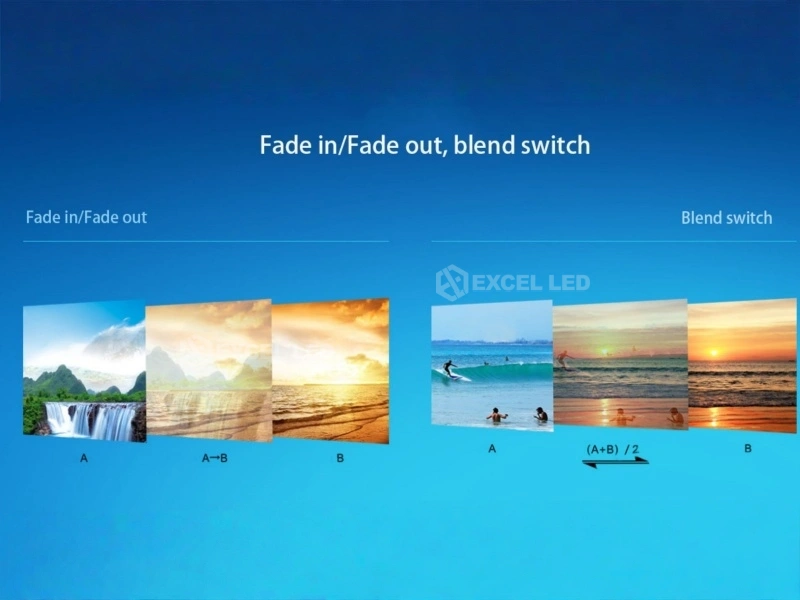
Three switching behaviours are documented on the unit — seamless switching for hard cuts, fade in fade out switching for soft transitions, and blend switching for mixed states — and two switching methods, so the same box suits a single operator and a rehearsed two-person show: one-key switch, or Pre. + Take cueing. Three sets of custom dual-picture display modes are available with one-key switch between modes, covering any PIP/PBP layout.
Reliability details matter as much as headline numbers in 24/7 control rooms. The input signal hot spare function keeps a standby source ready so output stays stable if a feed drops, and the platform is documented for 24/7 application with high reliability and stability. Control is via RS232 / USB / LAN / WIFI / Infrared.
Any In, Any Out
AIAO lets you take any interception of any input and place it on any output — free cropping for irregular LED canvases.
Dual-Picture Modes
3 sets of custom dual-picture display modes with one-key switching, supporting any PIP or PBP arrangement.
DVI Loop Cascade
Unlimited cascade with frame sync technology — no misalignment or delay between two adjacent image outputs.
Audio Channels
2 configurable external audio inputs plus HDMI, DP and SDI — 5 channels of audio sync switching in total.
LVP615S Inputs: 2× Video, YPbPr, VGA, DP, DVI, HDMI and SDI
The standard chassis carries seven input families, which is why the LVP615 series became one of VDWall’s most widely deployed LED video processor families. Two composite video inputs take legacy PAL/NTSC sources, YPbPr covers SD and HD component under CEA-861, two VGA inputs handle presentation PCs up to 2048×1152_60Hz under VESA, and the digital side runs DisplayPort 1.1, DVI and HDMI with HDCP 1.3 — the DVI and HDMI PC paths reaching 2304×1152_60Hz, with HDMI 1.3 (CEA-861) carrying 1920×1080p_60Hz. SDI arrives with a loop output for onward feed.
| Input / Output | Count & Connector | Capability |
|---|---|---|
| Video | 2 × composite | PAL / NTSC video system; amplitude and impedance 1V(p_p)/75Ω. |
| YPbPr | 1 × component | SD/HD under CEA-861; Y = 1.0V(p_p)/75Ω, Pb = 0.35V(p_p)/75Ω, Pr = 0.35V(p_p)/75Ω. |
| VGA | 2 × VGA (VESA) | PC (VESA) up to ≤2048×1152_60Hz; R, G, B = 0.7V(p_p)/75Ω. |
| DisplayPort | 1 × DP (VESA) | DisplayPort 1.1 (VESA). |
| DVI | 1 × DVI (VESA) | PC (VESA) up to ≤2304×1152_60Hz; custom input DVI EDID for perfect pixel-to-pixel display. |
| HDMI | 1 × HDMI (VESA / CEA-861) | HDCP 1.3; PC (VESA) ≤2304×1152_60Hz; HDMI 1.3 (CEA-861) ≤1920×1080p_60Hz. |
| SDI | 1 × SDI in + SDI loop | SMPTE 259M-C, SMPTE 292M, SMPTE 274M/296M, SMPTE 424M/425M — 480i_60Hz, 576i_50Hz, 720p, 1080i, 1080p; loop output passes the signal downstream. |
| Audio | 2 configurable external + HDMI / DP / SDI | Audio interface 2.0Vp-p/10KΩ; 2 configurable external audio inputs plus HDMI, DP and SDI make 5 channels of audio sync switch. |
| VGA OUT | 1 × RGBHV, 15-pin D_Sub (female) | RGBHV output at the selected output format — used for a monitor or confidence feed on site. |
| DVI OUT1 / OUT2 | 2 × 24+1 DVI_D | Two DVI_D outputs for wall drive and cascade, each at the selected output format. |

Two signal-level details are worth flagging for installers. First, the composite, YPbPr and VGA inputs publish their amplitude and impedance figures — 1V(p_p)/75Ω, 1.0V(p_p)/75Ω on Y with 0.35V(p_p)/75Ω on Pb/Pr, and 0.7V(p_p)/75Ω on RGB — which is what you check against long copper runs and passive splitters. Second, the input signal hot spare function keeps a standby input ready so the wall does not go dark when a source fails. The full signal path from processor to screen is mapped in our guide to connecting an LED display controller.
LVP615S Outputs: VGA, Dual DVI and Custom Output Formats
The output stage is deliberately simple to plan: 1× VGA (RGBHV) on a 15-pin D_Sub and 2× DVI (24+1 DVI_D), all driven at one selected output format. Twelve standard formats are documented, covering landscape, portrait and square LED canvases:
1024×768_60/75Hz · 1080×1920_60Hz · 1200×1600_60Hz · 1366×768_60Hz · 1440×900_60Hz · 1536×1536_60Hz · 1600×1200_60Hz · 1920×1080p_50/60Hz · 1920×1200_60Hz · 2048×1152_60Hz · 2304×1152_60Hz · 2560×816_60Hz.
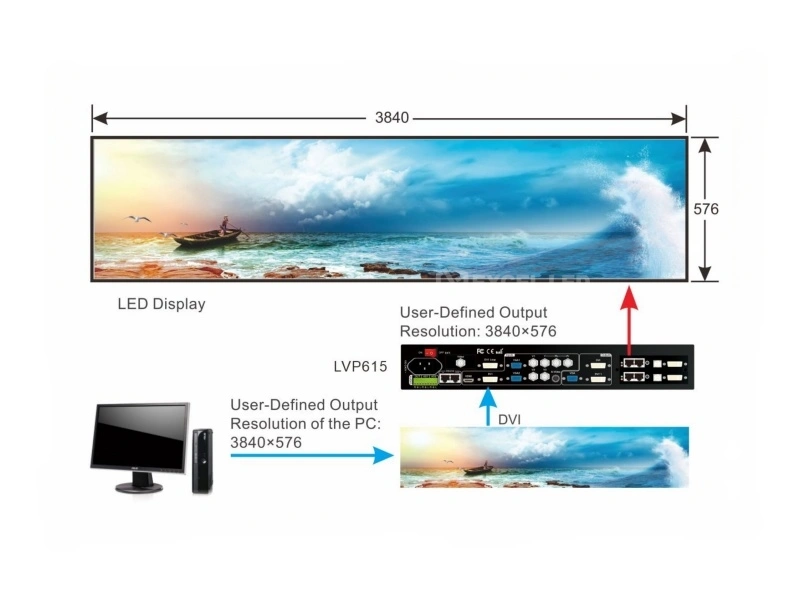
Anything outside that list is handled by the custom output format, and the ceiling is generous: a single unit can output a maximum of 3840 pixels horizontally or 1920 pixels vertically. That is the setting that lets an integrator match an unusual LED lattice exactly instead of scaling a standard raster into it — the classic example being a wide, short canvas such as 3840×576, which appears nowhere in the standard list but is well inside the custom limit.
Two further features complete the picture. AIAO (Any In Any Out) allows any interception of an input image and any output placement, so a region of a source can be cropped and routed without external scalers. And custom input DVI EDID makes the processor report the wall’s exact native timing back to the source PC, which is how perfect pixel-to-pixel display is achieved rather than approximated.

Splicing and multi-unit canvas planning follow the same logic and are covered in our LED video splicer guide.
DVI Loop Cascade: Driving Very Large LED Walls in Sync
A single processor has a ceiling; a chain of them does not. Each LVP615S carries a DVI loop, so units are cabled one into the next rather than fed from a distribution amplifier. The vendor documents unlimited cascade over this loop to realise a synchronised mosaic capable of driving indefinite LED lattice, with frame sync technology ensuring no misalignment or delay between two adjacent image outputs — the failure mode that shows up as a visible tear or a moving seam in the middle of a very wide wall.
The reference diagram in the vendor documentation shows exactly that arrangement at working scale: five LVP615S units — labelled 1/5A, 1/4B, 1/3B, 1/2B and 1/1A Main control — chained to drive a 3160×1800 LED display. One unit acts as the main control and the loop carries the canvas downstream, so the wall is treated as one image surface rather than five independent screens.
There is a practical source-side benefit too: the DVI loop is compatible with MacBook and similar unrestricted-output laptops, which is often the machine on the podium. Because the cascade is a loop rather than a matrix switch, the cabling plan stays linear and predictable on site — signal in, loop out, next unit.

Faroudja Processing: DCDI, Real Color and TrueLife on an LED Wall
The LVP615S is a new generation Faroudja® Real Color® professional LED video processor running 10+ bit Faroudja® DCDI Cinema Processing with the Faroudja® TrueLife™ video enhancer. Those three names describe three different jobs, and each one has a visible consequence on a large LED screen.
DCDI De-Interlacing: Clean Edges on Moving Pictures
Interlaced sources — 1080i broadcast, 480i and 576i legacy video — carry half a picture per field. Scaled naively onto a large LED wall, moving diagonals show stair-stepping and fine detail shimmers. DCDI (Directional Correlation De-Interlacing) reconstructs the missing lines along the direction of the edge instead of averaging across it, so diagonal edges stay clean and motion stays free of jagged artefacts — the difference is most obvious on sport, news tickers and camera pans across sharp architecture.
Real Color: Consistent Colour Across a Big Canvas
Real Color is the colour-management side of the platform: each YUV format signal channel colour can be adjusted individually, so an installer can align the look of a composite feed, a component feed and an HDMI feed to one house standard before the signal ever reaches the wall. On a multi-panel LED installation that means consistent skin tones and brand colours across the whole surface rather than a colour shift from one region to the next.
TrueLife and 10+ Bit: Depth Without Banding
TrueLife is the detail-and-contrast enhancer in the chain, and the 10+ bit processing pipeline keeps gradients smooth. On a large LED wall, smooth is the hard part: sky, smoke and studio backdrops are where 8-bit banding becomes visible as contour lines across metres of screen. A 10+ bit path through the processor keeps those gradients continuous.
Together with the switching and dual-picture features, this processing layer is what the LVP615 series is known for, and it is why the family sits at the front of so many fixed LED installations rather than only rental racks.
Wiring the LVP615S: Step-by-Step Configuration for the LED Wall
The sequence below follows the documented workflow: sources first, then the cascade decision, then the sending cards, then the output format, then the saved state. Working in this order avoids re-doing the output setup after the source list changes.
- Connect the sources — patch composite video, YPbPr, VGA, DP, DVI, HDMI and SDI in as the room requires, and take the SDI loop out to the next device in the chain. Set the custom input DVI EDID so the presentation PC sees the wall’s native timing.
- Choose the switching method — one-key switch for a single operator, or Pre. + Take for rehearsed cueing, with seamless, fade in fade out or blend switching between sources.
- Decide the canvas — a single unit, or a DVI loop cascade for a very large wall. In a cascade, one unit is configured as the main control (1/1A Main control in the vendor diagram) and the loop carries the canvas to the next unit down the chain.
- Use the built-in sending cards — two sending cards are built in and are compatible with 4×RJ45 port sending cards (cards optional), feeding the receiving cards and the LED lattice directly. Sending hardware options are listed in our sending controller range.
- Set the output format — pick from the twelve standard timings or define a custom output format (maximum 3840 pixels horizontal or 1920 pixels vertical per unit), then confirm the wall is pixel-to-pixel.
- Save the modes and the clock — store the switching modes and dual-picture presets for one-key recall, and set the RTC clock record function so the unit logs its operating time.
Control during commissioning and in service is available from the front panel, an infrared remote control, the PC software, wireless WIFI, LAN, USB or RS232 — and the input signal hot spare holds a standby source ready so a failed feed does not take the wall down.
LVP615S Manual, Datasheet and PC Control Software
Every figure on this page comes from the vendor’s own documentation for this model — the official PDF titled Overview of LVP615S V1.1 — including the input and output format lists, the signal-level and audio figures, the connector chart and the multi-unit cascade diagram. That document is not posted here as a static download, so it cannot go stale on you: request the LVP615S manual and datasheet with your quote and our team sends the current revision together with the configuration sheet for the exact unit you are ordering.
On the software side, the specification is deliberately plain: the documented control methods are RS232 / USB / LAN / WIFI / Infrared, and the control options list wireless WIFI, the front panel buttons, an infrared remote control and PC software. We describe the PC software at exactly that level rather than naming packages or version numbers — ask our team and we will confirm the current software for the unit you are ordering. What matters on site is that the processor can be driven from a PC over its documented control interfaces and, equally, from the front panel or the infrared remote when no laptop is on the desk.
Two practical notes for anyone assembling a submittal or a client handover. First, the interface supports Chinese, English, Spanish, Russian and Korean, so the operating language can be matched to the team running the wall. Second, the fastest way to get the right documents first time is to send the source list, the wall pixel dimensions and the sending-card plan with your request — the same three facts that drive the quote.
LVP615S vs LVP605 vs LVP909: Which VDWall Processor Fits
All three are VDWall LED video processors, and the differences are mostly about input count, output channel count and how the wall gets its pixels. The table uses the published figures for each model.
| Model | LVP615S ☆ | LVP605 | LVP909 |
|---|---|---|---|
| Video inputs | 2× Video | 3× Video | 2× Video |
| Other inputs | 1× YPbPr, 2× VGA, 1× DP, 1× DVI, 1× HDMI, 1× SDI in + SDI loop | 1× S-Video, 1× YPbPr, 2× VGA, 1× HDMI, 1× DVI, 1× EXT | 1× VGA, 1× HDMI, 1× DVI, 1× SDI (SDI / HD-SDI / 3G-SDI) |
| Outputs | 1× VGA + 2× DVI | 1× VGA + 2× DVI | 1× VGA + 4× DVI |
| Custom output ceiling | Max horizontal 3840 px or vertical 1920 px (single unit) | Max horizontal 3840 or vertical 1920 | Each output max 1920×1200@60Hz or 1440×1440@60Hz |
| Large-canvas method | DVI loop unlimited cascade with frame sync mosaic | — | 2/3/4-channel splicing; single unit supports max horizontal 14400 px or vertical 6400 px |
| Built-in sending cards | 2 built in (compatible with 4×RJ45 port sending cards; optional) | — | — |
| Max power consumption | ≤25W | ≤20W | ≤45W |
| Best fit | HD walls that need built-in sending cards plus cascade over SDI-appointed inputs | General LED processing with S-Video and EXT sources | Very large multi-channel splicing walls |
Model pages: VDWall LVP605 · VDWall LVP909 · VDWall LVP100 compact processor. Send the source list and the wall pixel dimensions and our engineers map the whole chain in one reply.
VDWall LVP615S Technical Specifications
| Parameter | Specification |
|---|---|
| Product type | LED HD video processor with built-in LED sending cards (VDWall LVP615 series) |
| Inputs (number / type) | 2× Video; 1× YPbPr; 2× VGA (VESA); 1× DP (VESA); 1× DVI (VESA); 1× HDMI (VESA/CEA-861); 1× SDI In + SDI loop |
| Video system | PAL / NTSC; composite amplitude and impedance 1V(p_p)/75Ω |
| YPbPr | SD/HD (CEA-861); Y = 1.0V(p_p)/75Ω, Pb = 0.35V(p_p)/75Ω, Pr = 0.35V(p_p)/75Ω |
| VGA input format | PC (VESA) ≤2048×1152_60Hz; R, G, B = 0.7V(p_p)/75Ω |
| DP input format | DisplayPort 1.1 (VESA) |
| DVI input format | PC (VESA) ≤2304×1152_60Hz |
| HDMI input format | HDCP1.3; PC (VESA) ≤2304×1152_60Hz; HDMI 1.3 (CEA-861) ≤1920×1080p_60Hz |
| SDI input format | SMPTE 259M-C, SMPTE 292M, SMPTE 274M/296M, SMPTE 424M/425M — 480i_60Hz, 576i_50Hz, 720p, 1080i, 1080p |
| Audio | 2.0Vp-p/10KΩ; 2 configurable external audio inputs, plus HDMI, DP and SDI — 5 channels audio sync switch |
| Outputs (number / type) | 1× VGA (RGBHV); 2× DVI |
| Output resolutions (VGA / DVI) | 1024×768_60/75Hz; 1080×1920_60Hz; 1200×1600_60Hz; 1366×768_60Hz; 1440×900_60Hz; 1536×1536_60Hz; 1600×1200_60Hz; 1920×1080p_50/60Hz; 1920×1200_60Hz; 2048×1152_60Hz; 2304×1152_60Hz; 2560×816_60Hz |
| Custom output format | Maximum output horizontal 3840 pixels or vertical 1920 pixels per single unit |
| Output ports | VGA OUT: 15-pin D_Sub (female); DVI OUT1: 24+1 DVI_D; DVI OUT2: 24+1 DVI_D |
| Built-in sending cards | 2 pieces built in; compatible with 4×RJ45 port sending cards (cards are optional) |
| Switching | Seamless switching; fade in fade out switching; blend switching. Two signal switching ways: one-key switch and Pre. + Take switch |
| Dual picture / PIP / PBP | 3 sets of custom dual-picture display mode with one-key switch between modes; any PIP/PBP display |
| Processing | New generation Faroudja® Real Color® professional LED video processor; 10+ Bit Faroudja® DCDI Cinema Processing; Faroudja® TrueLife™ video enhancer; individual colour adjustment per YUV format signal channel |
| Signal management | AIAO (Any In Any Out) — any interception and any output; custom input DVI EDID for pixel-to-pixel display; input signal hot spare function |
| Cascade | DVI Loop compatible with MacBook; unlimited cascade for sync mosaic to drive indefinite LED lattice; frame sync technology — no misalignment or delay between two adjacent image outputs |
| Control methods | RS232 / USB / LAN / WIFI / Infrared; wireless WIFI, front panel button, infrared remote control and PC software |
| On-screen languages | Chinese, English, Spanish, Russian and Korean |
| Clock function | RTC clock record function |
| Input voltage | 100-240VAC 50/60Hz |
| Maximum power consumption | ≤25W |
| Environment | Temperature 0-45°C; humidity 15-85% |
| Package size | 130 mm (H) × 350 mm (W) × 520 mm (L) |
| Weight | G.W. 5.7 kg / N.W. 4.0 kg |
| Operating profile | 24/7 application, high reliability and stability |

Price and Cost Factors
LVP615S pricing follows the configuration: the processor itself, the optional LED sending cards for the two built-in slots, cable and control accessories, quantity, and whether the project ships as a processor-only order or as part of a complete LED wall package. Because the unit is specified with a sending-card chain and cascade position, the fastest quote comes from three facts: source list, wall pixel dimensions, and quantity. Send them together and we return a factory-direct configuration with matched sending and receiving hardware. The LED standards this unit is specified against are published by SMPTE for the SDI formats and by VESA for the PC display timings.
VDWall LVP615S LED HD Video Processor FAQ
Q1 What is the VDWall LVP615S LED HD video processor?
The LVP615S is a professional HD LED video processor from VDWall’s LVP615 series. It takes multi-format video sources, scales and switches them without a visible cut, applies Faroudja® processing, and delivers the result to an LED wall either through its own built-in sending cards or through a cascaded DVI loop.
Q2 How many inputs does the LVP615S have?
The standard chassis provides 2× Video, 1× YPbPr, 2× VGA (VESA), 1× DP (VESA), 1× DVI (VESA), 1× HDMI (VESA/CEA-861) and 1× SDI in with an SDI loop output — seven input families on one unit, plus two configurable external audio inputs.
Q3 What is the maximum input resolution on the LVP615S?
The VGA inputs accept PC (VESA) signals up to 2048×1152_60Hz, while DVI and HDMI accept PC (VESA) up to 2304×1152_60Hz. The HDMI input also takes HDMI 1.3 (CEA-861) video up to 1920×1080p_60Hz, and the DisplayPort input is a VESA DP 1.1 interface.
Q4 Which SDI standards does the LVP615S accept?
The SDI input follows SMPTE 259M-C, SMPTE 292M, SMPTE 274M/296M and SMPTE 424M/425M, covering 480i_60Hz, 576i_50Hz, 720p, 1080i and 1080p. An SDI loop output is provided so the incoming signal can continue to the next device in the chain.
Q5 What output resolutions does the LVP615S support?
Twelve standard formats are documented for the VGA and DVI outputs: 1024×768_60/75Hz, 1080×1920_60Hz, 1200×1600_60Hz, 1366×768_60Hz, 1440×900_60Hz, 1536×1536_60Hz, 1600×1200_60Hz, 1920×1080p_50/60Hz, 1920×1200_60Hz, 2048×1152_60Hz, 2304×1152_60Hz and 2560×816_60Hz.
Q6 My wall size is not in the preset list — how do I set a custom output format?
Use the custom output format. Beyond the twelve standard timings, a single LVP615S outputs a maximum of 3840 pixels horizontally or 1920 pixels vertically, which is how a wide, short canvas such as 3840×576 is matched exactly instead of being scaled into a standard raster. Define the timing, apply it, and confirm on site that the wall is pixel-to-pixel.
Q7 How do I cascade two LVP615S units, and what keeps the seam aligned?
Cable the DVI loop output of one unit into the next, with one unit running as the main control — exactly as the vendor diagram does with five units (1/5A, 1/4B, 1/3B, 1/2B and 1/1A Main control) driving a 3160×1800 LED display. Frame sync technology is what keeps the seam clean: it ensures no misalignment or delay between two adjacent image outputs, so the cascade reads as one canvas rather than two screens. The DVI loop is also documented as compatible with MacBook.
Q8 How do I configure the built-in sending cards?
Two LED sending cards are built into the LVP615S and are compatible with 4×RJ45 port sending cards, and the cards themselves are optional. Because the sending cards sit inside the processor, the sending side and the output format are configured on the same unit; send your wall plan and receiving-card layout with the order and our engineers confirm the card choice against it.
Q9 The LVP615S setup is not working as expected — what should I check first?
Work through the documented chain in order. Confirm the source is selected and that its format sits inside the accepted range — VGA PC (VESA) up to 2048×1152_60Hz, DVI and HDMI PC (VESA) up to 2304×1152_60Hz, HDMI 1.3 (CEA-861) up to 1920×1080p_60Hz, and SDI within SMPTE 259M-C through SMPTE 424M/425M. Confirm the output format matches the wall, then check the cascade order if units are chained. Remember that the input signal hot spare function may have switched to a standby source, so verify which input is actually live before changing settings. If the wall still will not lock, ask for the manual with your quote and our engineers will walk the configuration with you.
Q10 What switching modes does the LVP615S offer?
Three behaviours are documented: seamless switching for hard cuts, fade in fade out switching for soft transitions, and blend switching. There are also two switching methods — one-key switch, and Pre. + Take switch — and three sets of custom dual-picture display modes with one-key switching for any PIP or PBP layout.
Q11 How is the LVP615S controlled, and does it need PC software?
The documented control methods are RS232, USB, LAN, WIFI and Infrared, and the control options list wireless WIFI, front panel buttons, an infrared remote control and PC software. A laptop is convenient but not compulsory — the front panel and the infrared remote cover day-to-day operation, and the interface supports Chinese, English, Spanish, Russian and Korean. We do not publish software names or version numbers for this model; ask our team and we will confirm the current software package for the unit you order.
Q12 How much does the LVP615S cost, and where can I get the manual?
Pricing depends on configuration — the processor, the optional LED sending cards for the two built-in slots, accessories and quantity — so we quote factory-direct instead of publishing a list price. Send the source list, wall pixel dimensions and quantity through our contact page for a same-day configuration and quote, and ask for the documentation in the same message: the vendor PDF (Overview of LVP615S V1.1) and the datasheet go out with the quote. The unit ships in a 130 mm (H) × 350 mm (W) × 520 mm (L) package at G.W. 5.7 kg / N.W. 4.0 kg.
The VDWall LVP615S, Delivered Ready for the LED Wall
The VDWall LVP615S gives integrators one HD processor that takes seven input families, switches them seamlessly, crops and places any image with AIAO, and reaches the wall through built-in sending cards or an unlimited DVI loop cascade — backed by Excelled’s pre-shipment testing and factory-direct support. Pair it with our LED screens and matching control hardware for a complete package.
Related reading: VDWall LVP605 LED video processor · Colorlight X16 LED video processor · Mooncell M40 2-in-1 LED video processor · Request a quote