
Mooncell M40 2-in-1 LED Video Processor
26M-pixel drive · 40 Gigabit outputs · 2×4K + 2×2K layers · 3D & Genlock
A 2-in-1 LED video processor that fuses video processing and sending control in one 1U-class unit — 40 gigabit Ethernet or 4×10G fiber outputs, 6 simultaneous display layers, 128 recallable scenes — supplied by Excelled, a trusted LED display manufacturer and controller supplier for global B2B system integrators.

M40 2-in-1 LED Video Processor at a Glance
What is it? The M40 is a 2-in-1 LED video processor — a video processor and LED sending unit in one box, developed by Mooncell (Shenzhen) and distributed factory-direct by Excelled Display.
How big a screen can it drive? Up to 26 million pixels through 40 gigabit Ethernet ports, or 20.8 million pixels through four 10G fiber optic ports — with a maximum output canvas of 16,384 × 16,384.
What video can it take? HDMI 2.0 and DP 1.2 inputs at 4K×2K 60 Hz, plus HDMI 1.4 and DVI — and it shows up to 6 layers at once (2×4K + 2×2K, or 6×2K) with PIP, roaming and seamless switching.
Who is it for? Rental & staging, broadcast control rooms, conference centers and retail video walls that need 4K60 input, multi-window compositing, 3D or Genlock in one rack unit.
What is included? 1× power cord, 1× USB cable, 1× DVI cable, 1× HDMI 2.0 cable, 1× DP cable, 1× DP-to-HDMI adapter and certificate — with factory-direct pricing and lead time from our sales team.
Why a 2-in-1 LED Video Processor Beats a Separate Processor Plus Sending Box
Classic LED video chains stack three boxes: a video processor, a sending unit, and a switcher or scaler for extra inputs. Each box adds a power supply, a mounting tray, and another handshake to fail during a show. The M40 2-in-1 LED video processor collapses processor + sender into a single unit, so the chain from camera or media server to receiving card is one device, one configuration, one point of control.
That consolidation is not only about rack space. Fewer boxes mean fewer EDID mismatches, fewer sync boundaries and a simpler fault path — which is exactly why Mooncell designed the M40 around one high-performance image processing chip with interlaced-video adaptive processing and noise reduction for stable, artifact-free output.
One Unit, Two Jobs
Video processing and sending control combined — skip the separate sending box, its cabling and its configuration step.
26M-Pixel Canvas
40 gigabit Ethernet ports carry up to 26 million pixels with custom output resolution up to 16,384 × 16,384.
Six-Layer Display
Run 2×4K + 2×2K or 6×2K layers with window overlay, roaming and seamless switching.
Scene Automation
128 scene templates with built-in clock for scheduled switching — lights-up changes run by themselves.
M40 LED Video Processor Inputs: HDMI 2.0 & DP 4K60, HDMI 1.4, DVI, Built-in Source
The M40 accepts UHD, HD and mixed-interface sources simultaneously and can show up to 6 screens while processing 5 different inputs. Every input supports custom EDID management, so source laptops and media servers see exactly the resolution you want them to output.
| Input | QTY | Capability |
|---|---|---|
| HDMI 2.0 (HDMI3) | 1 | Up to 3840×2160@60Hz; custom resolution; audio input with 10-bit audio; extreme width 7680 (7680×1080@60Hz) / extreme height 7680. |
| HDMI 2.0 built-in (HDMI4) | 1 | Built-in HDMI interface for the built-in playback board signal source — no external player needed for simple content loops. |
| HDMI 1.4 (HDMI1/HDMI2) | 2 | Up to 2304×1152@60Hz; custom resolution; audio input; no interlaced input. |
| DP 1.2 | 1 | Up to 4096×2160@60Hz; custom resolution; audio input with 10-bit audio; extreme width/height 7680. |
| DVI (DVI1/DVI2) | 2 | Up to 1920×1200@60Hz; custom resolution; no interlaced input. |
| Audio in / Audio out | 1 / 1 | 3.5mm audio input and output with audio/video follow switching (2K signal source carries no audio). |
Front-panel control is built around an LCD status display, a press-and-turn knob and per-input source keys (DVI1/DVI2, HDMI1–3, DP, built-in HDMI4) with dedicated WIN, PART, TEMPLATE, FREEZE and MODE function keys — an operator can cut to any input without touching a laptop.
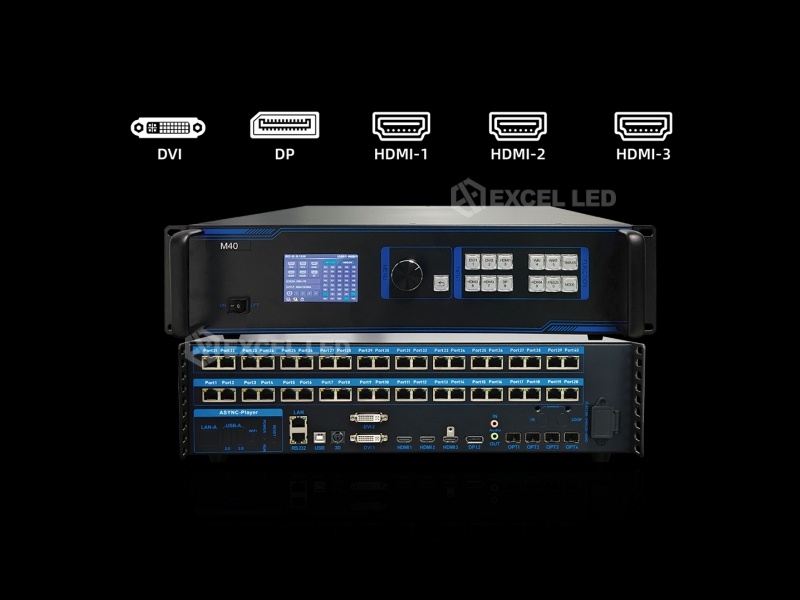
40 Gigabit Ethernet vs 4×10G Fiber Output: Which Serves Your LED Wall?
Mooncell M40 offers two output modes on the same processor. In Ethernet mode, 40 gigabit network ports feed receiving cards directly over standard network cable and drive up to 26 million pixels. In fiber mode, four 10G fiber optic ports (OPT1–OPT4) replace ports 1–32 in groups of eight, carrying up to 20.8 million pixels over long, EMI-immune fiber runs — optical modules are purchased separately.
| Item | Ethernet Output Mode | Fiber Optic Mode ☆ |
|---|---|---|
| Max load capacity | 26 million pixels | 20.8 million pixels |
| Ports | 40 × gigabit Ethernet (each up to 655,360 px, 1280×512) | 4 × 10G fiber (OPT1 = ports 1–8, OPT2 = 9–16, OPT3 = 17–24, OPT4 = 25–32) |
| Cable & distance | Network cable, standard installs | Fiber optic cable, long runs, strong EMI environments |
| Extra hardware | None | Optical modules purchased separately |
| Best for | Most fixed and rental LED walls ≤ 26M px | Stadiums, touring rigs, high-pixel-count shows — up to 20.8M px with clean long-distance signal |
Six Simultaneous Layers, 128 Scene Templates and Built-in Scheduling
Content on an LED wall is rarely a single window. The M40 supports picture-in-picture with window overlay, roaming and seamless switching — insert live camera or laptop streams into a 4K main canvas, and keep up to 2×4K + 2×2K layers, or 6×2K, in play at the same time. PC software gives you drag-and-drop window sizing and positioning.
Operators can store 128 scene templates and recall them from the front panel or by schedule — the built-in clock switches scene templates automatically, which matters for retail floors that change layouts by time of day and for houses of worship that shift between worship, presentation and broadcast looks.
Picture-in-Picture
Insert additional video streams into the main 4K input display with window overlay, roaming and seamless switching.
HDR & 10-Bit
HDR display support and 10-bit pipelines on HDMI 2.0 and DP inputs keep gradients smooth on fine-pitch panels.
Active 3D
Dedicated 3D interface connects the 3D transmitter for active 3D display on compatible LED screens.
Ops Protection
Key-lock, screen freeze, one-click black-out and data inspection keep showtime mistakes off the screen.

3D LED Display and Genlock: Frame-Locked Multi-Unit Cascades
For shows that combine 3D content with camera sync — or walls stitched from multiple processors — the M40 carries the interfaces the chain needs. A 3D port connects the 3D transmitter for active 3D, and the optional Genlock interface provides one input and one loop-through output, so several M40 units share a common clock and cut frames identically.
The cascade below is the configuration Mooncell documents for wide-format shows: a PC drives multiple 4K signal channels into several processors that are Genlock-locked, with each processor serving its own section of the LED screen — one frame boundary across the whole canvas.


Flexible Wiring Saves Cable, and Screen Damage Recovers Automatically
Large LED canvases eat network cable. With flexible wiring support, the M40 lets integrators connect a receiving-card chain with two network cables where traditional wiring needed three — one fewer cable per chain across a 40-port frame adds up quickly on both material cost and termination time.
And when a panel does fail on site, the M40’s data inspection function detects screen damage and runs automatic recovery, returning the affected zone to a working state instead of leaving a black hole mid-show while somebody climbs the truss.


Where the Mooncell M40 LED Video Wall Processor Earns Its Keep
Rental & Staging: 4K60 Multi-Camera LED Screens
Stage screens take several cameras plus show control at 4K60, then switch looks between acts. The M40 processes five input sources into six display layers, stores each act as a scene template, and its freezes, blacks and key-lock keep the operator in control during live shows.
Broadcast & Control Rooms: 24/7 Stitched Walls
In a control room every source is live and every wall is a single logical canvas. Multi-layer 4K windowing, custom EDID per input and built-in clock scheduling let engineers pre-program layout changes, while data inspection flags damaged zones early on a wall that never sleeps.
Retail & Venues: Scheduled Content, Minimal Staff
For storefront and venue walls, the built-in HDMI source plays simple loops without an external media player, and the 128 scene templates with scheduled switching rotate menus and branding automatically by time of day.
Mooncell 2-in-1 Series: M40 vs MVB12E vs MVB20E-G vs MVB4S Pro
Mooncell’s 2-in-1 processor family spans 2.6M to 26M pixels so each project buys only the drive capacity it needs. Specs below are taken from the published Mooncell specification sheets (V4.0/V4.1).
| Model | M40 ☆ | MVB12E | MVB20E-G | MVB4S Pro |
|---|---|---|---|---|
| Max load (Ethernet) | 26M px | 7.8M px | 13M px | 2.6M px |
| Gigabit outputs | 40 | 12 | 20 | 4 |
| Fiber optic outputs | 4 × 10G (20.8M px) | — | — | — |
| Max width / height | 16,384 / 16,384 | 7,680 / 3,840 | 15,360 / 15,360 | 3,840 / 1,920 |
| Layers / windows | 2×4K+2×2K or 6×2K | Up to 4 screens | 1×4K+1×2K or 5×2K | 2 windows (PIP / side-by-side) |
| Scene templates | 128, scheduled | 8 + timer list | 10, scheduled | Timed switching |
| 3D display | Yes (active 3D) | — | Yes (active 3D) | — |
| Genlock | Optional in + loop | — | In + loop | — |
| Light sensor input | — | — | Yes (auto brightness) | — |
| Built-in media source | HDMI (built-in) | — | HDMI (built-in) | — |
| Typical fit | Rental, stadium, high-pixel walls, fiber runs | Mid-size fixed walls | Stage & large fixed walls | Small walls & budget projects |
Model pages: MVB12E 2-in-1 processor · MVB20E-G 2-in-1 processor · MVB4S Pro. Unsure which fits? Send us your panel resolution and receiving-card model — our engineers map it in one reply.
M40 2-in-1 LED Video Processor Technical Specifications
| Parameter | Specification |
|---|---|
| Drive capacity per port | Max 655,360 px per gigabit port (1280 × 512 per port load) |
| Max load — Ethernet | 26 million pixels |
| Max load — Fiber optic | 20.8 million pixels (4 × 10G optical ports) |
| Max output width / height | 16,384 / 16,384 pixels (confirmed; above 8,192 px height, total load tapers but stays ≥ 11.98M px) |
| Rated voltage | AC 100–240 V, 50/60 Hz |
| Rated power | 36 W |
| Working temperature / humidity | 0–50 °C / 5–85% RH, non-condensing |
| Storage temperature | −10–60 °C |
| Unit dimensions (W×D×H) | 482.2 × 360 × 111 mm ±0.3 |
| Net weight | 6.43 kg |
| Outer carton / gross weight | 565 × 445 × 185 mm / 8.3 kg |
| Packing | 1 unit per box |
| Accessories | Power cord, USB cable, DVI cable, HDMI 2.0 cable, DP cable, DP-to-HDMI adapter cable, certificate of conformity |
| Control interfaces | USB-B (PC configuration), 100M LAN, RS232, front LCD + knob + keys |
| Control software | Mooncell PC software (window drag-and-drop opening, sizing & positioning) |
Video Source Characteristics (confirmed)
| Input | Color Depth | Max Input Resolution |
|---|---|---|
| HDMI 2.0 | 8-bit / 10-bit (RGB 4:4:4, YCbCr 4:4:4 / 4:2:2 / 4:2:0) | 3840×2160@60Hz |
| HDMI 1.4 | 8-bit (RGB 4:4:4, YCbCr 4:4:4 / 4:2:2) | 2304×1152@60Hz |
| DP 1.2 | 8-bit / 10-bit (RGB 4:4:4, YCbCr 4:4:4 / 4:2:2) | 4096×2160@60Hz |
| DVI | 8-bit (RGB 4:4:4, YCbCr 4:2:2 / 4:4:4) | 1920×1200@60Hz |
M40 2-in-1 LED Video Processor Buying Guide: 5 Checks Before You Order
- Count your pixels honestly. Width × height of the wall (including any processing headroom) must sit under 26M px in Ethernet mode or 20.8M px over fiber — and under the 16,384 width / height limits. Over 8,192 px of height, keep the ≥11.98M taper in mind.
- Choose the output medium. Standard installs run network cable to receiving cards; choose the 10G fiber option only when distance or EMI makes copper painful — modules are bought separately.
- List your sources and layers. Five inputs into six display layers covers most shows; if a single canvas needs more simultaneous 4K sources, plan two M40 units with Genlock instead of forcing one unit.
- Decide who operates it. Front-panel LCD + knob suits AV crews; scheduled scene templates suit unattended retail; if you need cloud management, check our networked players instead.
- Confirm receiving-card compatibility. The M40 drives Mooncell receiving card series and standard gigabit receiving cards; send your card model and panel width/height and we will pre-verify the load plan.
Price and Cost Factors
Because the M40 replaces a separate sending box, total system cost is typically one enclosure, one PSU, one license and one spare rather than two of each. The main price variables are output configuration (Ethernet only vs. with optical modules), order quantity, and whether you want pre-configured cabling plans and on-site commissioning support — tell our team the wall size and we’ll quote the whole drive chain, not just the box.
M40 2-in-1 LED Video Processor FAQ
Q1 What is a 2-in-1 LED video processor, and why does the M40 combine two functions?
A 2-in-1 LED video processor merges the video processor (scaling, layering, switching) and the LED sending unit (distributing the signal to receiving cards) into one device. The Mooncell M40 saves a rack unit, a power supply and one configuration step compared with separate boxes, and it keeps the whole video chain under a single control interface — simpler to deploy, operate and troubleshoot on LED walls up to 26 million pixels.
Q2 How many pixels can the M40 2-in-1 LED video processor drive?
In Ethernet output mode the M40 drives up to 26 million pixels through 40 gigabit ports, each port handling a maximum of 655,360 pixels in a 1280×512 load format. In fiber optic mode it drives up to 20.8 million pixels through four 10G ports. Maximum output canvas width and height are both 16,384 pixels; above 8,192 pixels of height the total load tapers gradually but never below 11.98 million pixels.
Q3 What video inputs does the M40 LED video processor support?
The M40 accepts one HDMI 2.0 input (up to 3840×2160@60Hz), one built-in HDMI 2.0 interface for its internal playback board, two HDMI 1.4 inputs (up to 2304×1152@60Hz), one DP 1.2 input (up to 4096×2160@60Hz) and two DVI inputs (up to 1920×1200@60Hz). All inputs support custom resolution and custom EDID management, and HDMI 2.0 plus DP accept 10-bit video.
Q4 Ethernet or fiber optic output: which one should I order with the M40?
Choose the 40 gigabit Ethernet outputs for most fixed and rental LED walls — network cable to the receiving cards is simple, serviceable and drives up to 26 million pixels. Choose the four 10G fiber ports when the drive distance is long or the environment is electrically noisy, since fiber carries up to 20.8 million pixels over clean optical runs. Optical modules are not included and are purchased separately.
Q5 How many windows or layers can the M40 show at the same time?
The M40 can display up to 6 screens simultaneously while processing 5 different input sources. Layer combinations reach 2×4K plus 2×2K, or 6×2K windows, with picture-in-picture, window overlay, roaming and seamless switching between sources — so a 4K main canvas can carry live camera inserts and laptop feeds without dropping frames.
Q6 Can the M40 LED video processor handle 4K@60Hz sources?
Yes. The HDMI 2.0 input and the DP 1.2 input both accept 3840×2160@60Hz (DP also takes 4096×2160@60Hz) with 8-bit or 10-bit color in RGB 4:4:4 and YCbCr formats. HDMI 1.4 inputs reach 2304×1152@60Hz and DVI reaches 1920×1200@60Hz, which covers typical media servers, cameras and presentation laptops at full 4K60.
Q7 Does the M40 support 3D LED display?
Yes, the M40 supports active 3D display. A dedicated 3D interface on the rear panel connects the 3D transmitter, which synchronizes active-shutter glasses with the LED screen. The full documented chain is a 3D media player feeding the processor, then the 3D transmitter between the processor and the 3D LED display.
Q8 What is Genlock on the M40, and when do I need it?
Genlock locks a device’s frame timing to an external sync source. The M40’s optional Genlock interface provides one input and one loop-through output, so multiple M40 units can share one clock and produce perfectly aligned frames across a single large canvas — typically needed when one LED wall is driven by several processors or when cameras must cut in frame-synchronized.
Q9 Can the M40 switch scenes automatically without an operator?
Yes. The M40 stores up to 128 scene templates and includes a built-in clock with scheduled scene template switching, so layouts can change automatically by time of day — useful for retail walls and venues that rotate content between morning, afternoon and evening shows. Scenes are also recallable instantly from the front panel or via the PC control software.
Q10 How is the M40 2-in-1 controller controlled and configured?
You can control the M40 three ways: from the front panel LCD with its press-and-turn knob and dedicated source and function keys; over the PC control software (USB-B, 100M LAN or RS232) where windows are opened, sized and positioned by drag-and-drop; or through the RS232 serial protocol for third-party control systems. EDID, output resolution and scene settings are all adjustable from the menu.
Q11 Does the M40 LED video processor handle audio?
Yes. The M40 has a 3.5mm audio input and a 3.5mm audio output, and HDMI 2.0 plus DP inputs accept embedded audio including 10-bit audio. Note that audio follows the selected video source and that 2K-class signal sources carry no audio. The audio output can feed an external amplifier or audio system alongside the LED screen.
Q12 How much does the M40 2-in-1 LED video processor cost, and what is in the box?
Pricing depends on quantity, output configuration and whether you need pre-configured load plans or commissioning support, so contact our team for a factory-direct quote. The box includes the M40, one power cord, one USB cable, one DVI cable, one HDMI 2.0 cable, one DP cable, one DP-to-HDMI adapter cable and a certificate of conformity — optical modules for fiber mode are purchased separately.
The M40 2-in-1 LED Video Processor, Delivered as a Complete Drive Chain
Mooncell M40 gives integrators one 1U-class unit that processes, layers and sends up to 26 million pixels — backed by Excelled’s pre-shipment testing, receiving-card compatibility checks and factory-direct support. Pair it with our LED screens or retrofit it onto an existing wall.
Related reading: Mooncell MVB12E 2-in-1 video processor · Mooncell MVB20E-G 2-in-1 video processor · Mooncell MVB4S Pro · Request a quote