
Poster LED Display
Freestanding & Folding Formats · Indoor & Outdoor · Buyer’s Guide & Price
A freestanding or folding, wheel-mounted LED poster display that replaces static print with moving content — supplied by EXCEL LED, an LED display manufacturer serving global B2B system integrators and signage distributors.

Poster LED Display: Quick Answer
EXCEL LED supplies poster LED displays as flat 560 × 1,890 mm or folding 640 × 1,920 mm units.
- Pitch: P1.75–P2.5 indoor, P2.5 outdoor, by viewing distance.
- Brightness: 600–1,100 nits indoor, 4,000+ nits outdoor.
- Price: dealer listings $1,400–$14,500; indoor $1,850–$3,800.
- Control: WiFi, USB, app or cloud, no PC on site.
- Splicing: units join into a larger video wall.
What Is a Poster LED Display and How Does It Work?
A poster LED display is a direct-view LED screen assembled into a portrait cabinet that stands on the floor and is sized to occupy the same footprint as a printed poster. Unlike a video wall, it arrives as one finished unit: cabinet, modules, receiving card, power supply, media player and stand are integrated, so it plugs into a wall socket and plays within minutes.
The distinction that matters commercially is that this is direct-view LED, not a backlit print and not an LCD panel. Where a supplier markets the same hardware as a digital poster display, they are describing this product: the screens are identical, only the label differs. Every pixel is a light source, so there is no backlight bleed, no bezel, and no glass layer between the viewer and the image. Because the light comes from the pixels themselves and the module face is matte, a poster LED display screen also shows far less reflection under ceiling spotlights than a glass-fronted light box.
The Four Sub-Assemblies Inside a Poster LED Display
- LED modules — the pixel-carrying panels. On the 560 × 1,890 mm platform these are 210 × 280 mm modules arranged in a 9 × 2 layout, front-serviceable on magnetic mounts.
- Cabinet and frame — 570 × 1,920 mm outer frame, with a slim 33 mm panel profile on a 330 mm wheel base for stability.
- Control electronics — receiving card, power supply and a built-in media player that accepts WiFi, USB, app or cloud content.
- Power and mobility — a 100–240 V AC universal supply and a wheel-mounted base, so one person can reposition the unit without tools.
Printed-Poster Footprint
560 × 1,890 mm of display area replaces a conventional poster panel at the same floor footprint.
Flicker-Free on Camera
1920 Hz standard with a 3840 Hz option, so phone cameras and broadcast cameras record without banding.
One-Person Portable
Around 27 kg per unit on built-in wheels — no rigging, no lifting equipment, no installer on site.
80,000-Hour Lifetime
Rated to 50% brightness, which is roughly nine years of continuous 24/7 operation.
Poster LED Display Formats: Flat 560 × 1,890 mm or Folding
Two platforms are in production side by side, and every other decision on this page follows from which one you need. The flat, freestanding format is the classic poster cabinet: it stays assembled, moves on its built-in castors, and is the size most public dealer listings quote. The folding format trades weight for transportability and packs down to a fraction of its standing height. They share control systems, content workflow and maintenance logic, but not dimensions, weight, pitch range or price.
| Attribute | Flat, freestanding ★ | Folding |
|---|---|---|
| Display area | 560 × 1,890 mm (1.06 m²) | 640 × 1,920 mm (1.23 m²) |
| Transport | Stays assembled, moves on castors | Folds to a 90 mm package |
| Weight per unit | Around 27 kg | Around 43 kg |
| Pixel pitch range | P1.75 – P2.5 mm | P1.25 – P2.5 mm |
| Module layout | 210 × 280 mm, 9 × 2 | 320 × 160 mm, 2 × 12 |
| Surface technology | SMD face | GOB encapsulated |
| Built-in audio | Not standard | Two speakers as standard |
| Mounting options | Floor-standing, wall-mount or hanging | Floor-standing on a wheel base |
| Choose when | It stays in one building | It has to be packed and moved |
| Full specification | 1890x560mm LED poster display | tri-fold LED poster display |
Flat 560 × 1,890 mm Poster
Stays assembled on a wheeled base, 33 mm thin and around 27 kg, and splices side by side into a larger video wall.
Folding 640 × 1,920 mm Poster
Packs down to a 90 mm package for transport, with a GOB face, built-in speakers and a pitch range down to P1.25.
Fold Up and Down Screen
The tallest canvas in the family at about 2,180 mm, folding in half on a single mid-height hinge to a 1,090 mm pack.
Everything else on this page — cost, viewing distance, control, splicing, indoor and outdoor builds, maintenance — applies to both formats. Where a number differs between them, it is stated on the format’s own product page rather than here.
Poster LED Display Types, Faces and Mounting Configurations
Beyond the choice of platform, a poster LED display is specified along two further axes: how many faces it shows, and how it is fixed in place. Both are decided by the site rather than by the product, and both change what the unit can do.
Single-Sided and Double-Sided Poster LED Display Faces
A single-sided unit carries one LED face and is the default for a screen against a wall, in a window or at the end of an aisle — anywhere viewers approach from one direction. A double-sided unit carries modules on both faces and plays to traffic arriving from either side, which is what an aisle, a corridor, an exhibition booth or a store entrance needs.
The trade-off is depth and cost. A double-sided cabinet has to house two module faces, two sets of drivers and enough separation between them to keep both cool, so it is deeper and heavier than the single-sided unit it replaces. Choose it when the footfall is genuinely two-way; a single-sided unit turned to face the busier direction usually costs less and performs the same job.
Curved and Flat Poster LED Display Cabinets
Most poster LED displays are flat, because a poster is flat. Where the architecture curves — a rounded column, a curved shopfront, a circular stand — a curved cabinet follows the surface instead of leaving a wedge-shaped gap behind it. Curved units use the same modules and the same control system as the flat ones; what differs is the cabinet profile and the angle at which the modules are mounted.
| Configuration | What it is for | Main trade-off |
|---|---|---|
| Single-sided | Wall, window and end-of-aisle positions with one-way footfall | None — the simplest and cheapest build |
| Double-sided | Aisles, corridors, booths and entrances with two-way footfall | More depth, more weight, higher cost |
| Curved | Columns, curved shopfronts and circular stands | Custom cabinet profile; modules are not interchangeable with a flat build |
| Floor-standing | Retail floors, lobbies and exhibitions — anywhere the unit may move | Needs floor space and a level surface |
| Wall-mounted | Contested floor space; screens that should read as part of the wall | Rear service access has to be designed in |
| Hanging | Atriums and transport hubs where the floor below must stay clear | Rigging and a load-rated fixing point |
How Mounting Changes a Poster LED Display Specification
Mounting is not a bracket decision; it changes what has to be ordered. A wall-mounted unit does not need the wheeled base, but it does need a service gap behind the panel, because a rear-service cabinet fixed flush to a wall cannot be repaired. A hanging unit needs the frame’s own mounting points and a rated fixing point above it, and it gives up the mobility that made the format attractive in the first place.
The practical rule is to settle the mounting method before the order rather than after delivery. The same panel serves all three methods on the flat platform, so the choice costs nothing at the factory — but it costs a site visit if it is made once the unit has arrived and the base is already in place.
How Much Does a Poster LED Display Cost in 2026?
No LED display manufacturer publishes a list price, and any page quoting a single number for a poster LED display is either guessing or quoting one specific configuration. What can be verified is what dealers actually advertise, and that is what the tables below use.
Everything in this section comes from public dealer and retailer listings. These are not EXCEL quotations, and they carry a dealer margin on top of factory cost.
Published Poster LED Display Dealer Prices by Configuration
| Configuration | Listed Price (USD/unit) | Public Source |
|---|---|---|
| Indoor poster, non-splicing, 640×1920, P1.25–P2.5 | From $1,850 | LEDLightsWorld, EP-B Series |
| Indoor poster, splicing-capable, 640×1920 | From $2,590 | LEDLightsWorld, EP-S Series |
| Indoor poster, GOB sealed face, 640×1920 | From $2,790 | LEDLightsWorld, EP-GOB Series |
| Indoor poster, splicing-capable, 960×1920 | From $3,800 | LEDLightsWorld, EP-S Series |
| Foldable poster, 80 in, P1.9, NovaStar, wheels | $5,426.99 (1–5 units) $5,149.99 (6–18 units) |
Displays2Go |
| Tri-fold foldable poster | From $7,500 | LEDLightsWorld |
| Category entry-level dvLED poster | From $1,399.99 | Displays2Go |
| Premium full-feature poster system | From $14,505 (list $15,870) | LEDLightsWorld, EP Series |
Published Poster LED Display Market Bands
| Source and Scope | Published Band |
|---|---|
| SRY LED, single-unit retail (RRP) | $1,200 – $10,000+ |
| SRY LED, fixed indoor P2.0–P3 | $1,500 – $6,000 |
| SRY LED, high-resolution indoor P1.25–P1.86 | $2,600 – $5,200+ |
| SRY LED, outdoor poster P3.91–P4 | $5,000 – $20,000+ |
| Unit-LED, general single-unit range | $1,000 – $5,000 |
| Displays2Go, dvLED poster category filters | $1,000–2,500 / $2,500–5,000 / $5,000–100,000 |
What Actually Drives Poster LED Display Cost
| Cost Factor | Why It Moves the Price | Verified Impact |
|---|---|---|
| Pixel pitch | Halving the pitch roughly quadruples the number of LEDs packed into the same 1.06 m². P1.25 costs materially more than P2.5 for an identical cabinet size. | P1.25–P1.86 vs P2.0–P2.5 listed $2,600–$5,200+ vs $1,500–$6,000 |
| Splicing capability | Edge alignment structure, extra cabinet rigidity and calibration for multi-unit walls. | +40% ($1,850 → $2,590, same size and pitch) |
| GOB encapsulation | Adds the resin-fill production step and lowers module failure rates in handling. | +51% ($1,850 → $2,790) |
| Screen width | A 960 mm panel carries 50% more modules than a 640 mm panel at the same height. | +47% ($2,590 → $3,800) |
| LED chip grade | Branded chips hold brightness and colour consistency far longer than unbranded bins. | Typically +10% to +30% (typical) |
| Refresh rate | 3840 Hz needs faster driver ICs, which matters if the screen will be filmed. | Option cost, confirm per project (typical) |
| Control system | A branded controller and receiving-card set costs more than a generic one. | Varies by brand and licence (typical) |
| Ingress protection | Outdoor builds need gaskets, sealed connectors, conformal coating and brighter LEDs. | Outdoor class starts near $5,000 |
| Order quantity | PCB setup, tooling and freight are amortised across the batch. | −5.1% at 6–18 units ($5,426.99 → $5,149.99) |
| Extended warranty | Priced separately by most dealers rather than bundled into the unit. | 2 yr $199.99 / 3 yr $279.99 (Displays2Go) |
| Certification | UL, ETL, CE and FCC testing plus documentation, required for many tenders. | Confirm per destination market |
| Freight and duty | A poster ships in a flight case and is volumetric, so packaging efficiency affects landed cost. | Quote by destination |
Poster LED Display Total Cost of Ownership
Sticker price is roughly half the decision. Over a five-year horizon on a single indoor unit, the recurring lines are power, content, spare modules and service access.
- Power. An indoor poster draws a fraction of a full video wall — one unit on 100–240 V AC is a standard socket load, so no electrical works are needed.
- Content. Effectively zero marginal cost per change, against $50–$300 per reprint for a static poster.
- Spare modules. Keep 2–3 spare 210 × 280 mm modules per fleet; rear service swaps them in minutes without dismantling the cabinet.
- Service access. A rear-service design is what keeps maintenance a one-person job rather than a two-person rigging task.
Poster LED Display vs LCD Poster vs Backlit Light Box
Three technologies compete for the same floor space and they are not interchangeable. The table below compares them on the attributes that actually decide the purchase.
| Attribute | Poster LED Display ★ | LCD Poster | Backlit Light Box |
|---|---|---|---|
| Peak brightness | 600–1,100 nits indoor 4,000+ nits outdoor |
350–700 nits (typical) | Reflective, ~200–500 nits equiv. (typical) |
| Bezel or seam | None — direct view | Bezel present; seams when tiled | Frame edge by design |
| Splice into a large canvas | Yes, seamlessly | Visible seams, alignment drift | No |
| Rated lifetime | 80,000 h to 50% brightness | 30,000–50,000 h (typical) | Tube or lamp replacement cycles |
| Content type | Video, live data, scheduled playlists | Video, static | Static print only |
| Time to change content | Minutes, remote | Minutes to hours, networked | Days — reprint and manual swap |
| Outdoor capability | Yes — IP65 front / IP54 rear | Requires a weatherproof enclosure | Yes, with a sealed frame |
| Relative power draw | Highest | Middle | Lowest |
| Relative unit cost | $1,850–$7,500 typical | Lower at small sizes | $50–$800 |
| Impact in daylight | Readable in direct sun at 4,000+ nits | Washes out above roughly 700 nits ambient | Fades in direct sun |
| Best suited to | High-traffic retail, events, DOOH, rental fleets | Offices, wayfinding, budget installs | Fixed static menus and window graphics |
The decisive rows are splicing and content velocity. An LCD panel can match LED on a single small screen, but the moment you want four units to read as one 3.7 m canvas, the seams give it away. And a light box wins on cost every time until the message changes more than twice a year, at which point the reprint invoices overtake the screen.

How to Choose Pixel Pitch and Size for an LED Poster Screen
Pixel pitch is the only specification that cannot be changed after purchase, so it should be chosen first and everything else should follow. The rule is simple: the closer people stand, the smaller the pitch must be.
Poster LED Display Viewing Distance Calculation
The industry rule of thumb for minimum comfortable viewing distance is one metre for every one millimetre of pixel pitch, with optimal viewing starting at roughly three times that distance. At the far end, the maximum useful viewing distance is set by screen height rather than by pitch, so a fine-pitch poster display still reads across a large lobby. In short:
- Minimum distance (m) ≈ pixel pitch (mm) ÷ 1,000 × 1
- Optimal distance (m) ≈ pixel pitch (mm) ÷ 1,000 × 3
Poster LED Display Pitch Selection by Application
| Where It Goes | Recommended Pitch ★ | Why |
|---|---|---|
| Luxury retail, jewellery, cosmetics counter | P1.25 – P1.53 | Viewed inside 2 m; fine detail and small text must stay sharp |
| Restaurant menu board, hotel lobby | P1.53 – P1.86 | Text-heavy content read at 1.5–3 m |
| Mall atrium, exhibition booth, showroom | P1.86 – P2.5 | Viewers stand 3 m and further, so cost efficiency matters |
| Event and rental fleet, stage backdrop | P2.5 GOB | Mixed distances and constant handling, so prioritise durability |
| Storefront window, street facing, DOOH | P2.5 outdoor | Needs 4,000+ nits against daylight; viewed from 5 m and beyond |
Sizing: How Many Poster LED Display Units Do You Need?
A single poster unit covers 1.06 m². Because the cabinets are designed to splice, the size question becomes multiplication rather than a custom build.
| Number of Units | Combined Display Area | Typical Deployment |
|---|---|---|
| 1 unit | 560 × 1,890 mm (1.06 m²) | Single window, doorway, counter end |
| 2 units | 1,120 × 1,890 mm (2.12 m²) | Flanking an entrance; near-square canvas |
| 3 units | 1,680 × 1,890 mm (3.17 m²) | Approaching 16:9 at pitch-matched resolution |
| 4 units | 2,240 × 1,890 mm (4.23 m²) | Mall atrium feature wall |
| 6 units | 3,360 × 1,890 mm (6.35 m²) | Full-height retail window; the point where per-unit pricing typically steps down |
If you already know the pitch and are working backwards to resolution, our P2.5 indoor LED display page carries the full calculation worked through, and the fine pitch LED display range covers the sub-P2 options in more depth.
Splicing LED Poster Screens Into a Video Wall
Splicing is the capability that separates a poster LED display from a large digital photo frame. Because the cabinets are mechanically aligned and calibrated to match, several units placed side by side play as a single continuous canvas with no visible boundary between them — and the same units can be split apart again for individual use.
This is what makes the format attractive to rental companies in particular: one fleet serves both a single-unit lobby booking and a multi-unit stage backdrop.
What to Verify Before You Splice Poster LED Screens
- Same batch, same bin. Mixing production batches risks visible brightness and colour steps at the join. Order the full quantity as one batch.
- Pitch and resolution match. All units in a wall should share pitch so the pixel grid stays continuous; a P1.86 unit beside a P2.5 unit will show a step in pixel density.
- Cabinet alignment. Confirm the splicing hardware and the tolerance the factory holds between adjacent cabinets.
- Calibration. Ask for a factory calibration report covering the full spliced canvas, not per-unit calibration only.
- Receiving card capacity. How many units one controller can drive depends on the card’s port count and the resolution per unit — see the LED control system collection for the controller range.
Indoor vs Outdoor Poster LED Display: Which Do You Need?
The two versions look almost identical on a spec sheet and are different products underneath. Choosing wrong is the most expensive mistake in this category, because an indoor poster display placed outside will fail within one rainy season and there is no retrofit.
The distinction is not cosmetic. An indoor poster display is engineered around a controlled room: ventilation instead of gaskets, a lower brightness bin that will not dazzle people standing a metre away, and a wide viewing cone for viewers approaching from any angle. An outdoor poster display inverts all three — sealed to IP65 at the front, driven hard enough to hold contrast against direct sun, and optimised for a viewing distance measured in metres rather than centimetres.
| Attribute | Indoor ★ | Outdoor |
|---|---|---|
| Brightness | 600–1,100 nits (typical) | ≥4,000 nits |
| Ingress protection | IP30 standard cabinet (typical) | IP65 front / IP54 rear |
| Viewing angle | 160° / 160° — wide, for close-in viewers | 140° / 120° — narrower, optimised for distance |
| LED package | SMD1415 / 1515 / 2121 | SMD1921 — higher-brightness bin |
| Cabinet sealing | Ventilated; convection cooling | Gasketed, coated boards, sealed connectors |
| Operating temperature | −10 °C to +40 °C (typical) | −20 °C to +50 °C (typical) |
| Mobility | Built-in wheels, standard | Optional wheels — the unit is heavier |
| Typical price class | $1,850 – $3,800 | From $5,000 |
| Choose when | The unit is under cover and moved regularly | It faces weather, or faces daylight, or both |

The wheeled poster format is the configuration normally specified for shopfronts, entrance advertising and other positions in front of a door:
Installation, Control System and Content Management
Installation is the shortest part of a poster LED display project precisely because the unit arrives assembled. There is no cabinet build, no module-by-module assembly and no separate media player to house.
Three Poster LED Display Mounting Configurations
- Floor-standing with wheels — the default. Roll into position, plug into a standard 100–240 V AC socket, play. No fixing, no tools, repositionable at will.
- Wall-mounted — for a permanent position where floor space is at a premium. The 33 mm panel profile keeps the unit close to the wall.
- Hanging — for retail ceilings and exhibition rigs where the screen should sit above eye level.
On the floor-standing version the wheels and the speakers are part of the chassis rather than bolt-on accessories, which is what lets one member of shop staff move a live unit between two positions without an installer:
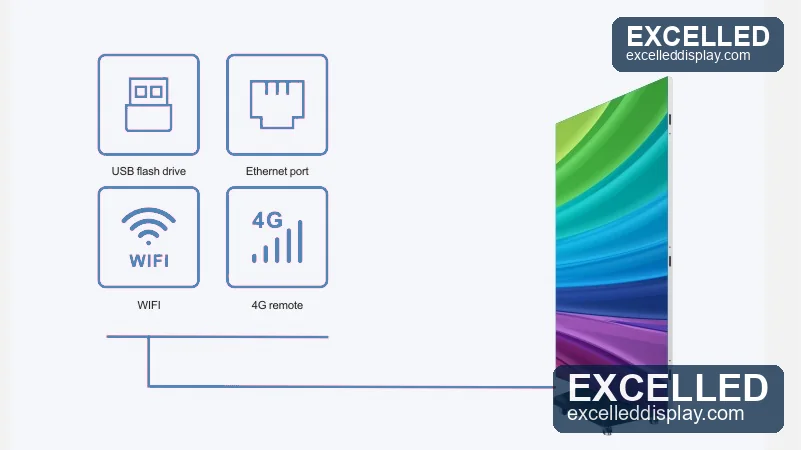
Poster LED Display Content Control: Four Ways In
Wireless Update
Publish to the screen over the local network from a phone, tablet or laptop. No cabling to the unit.
Plug-and-Play
Load a playlist onto a USB drive and insert it. Useful where no network exists on site.
Mobile Control
Schedule, switch playlists and adjust brightness from a phone — no PC on site at any point.
Multi-Site Management
Manage a fleet across locations from one dashboard, with per-screen scheduling and reporting.
For larger deployments, poster units run on the same control ecosystem as fixed installations — controllers such as NovaStar and Colorlight are widely supported, so one operator can manage poster units alongside indoor LED screens and outdoor LED displays rather than running separate systems.
If you are specifying Colorlight hardware for a spliced poster wall, the receiving cards and their port counts are the part that decides how many units one controller can drive. We keep a reference on Colorlight receiving card models covering the current i-series, and the matching Colorlight X series processors if the installation also needs a video processor at the front end. Configuration is normally pre-loaded at the factory: you supply the resolution, the content format and the network details, and the unit ships with its receiving card settings already mapped.
LED Poster Display Maintenance and Spare Parts
A poster LED display is maintained at module level rather than unit level, which is what keeps whole-life cost low. Because the modules are magnetic and rear-serviceable, a failed module is a two-minute swap rather than a return-to-factory repair.
This is the working side of the unit. Service access, the receiving card, the power supply and the internal cabling all sit behind the module faces, so a module swap never requires the screen to be taken down or shipped back.
Poster LED Display Routine Maintenance Schedule
| Interval | Task | Why It Matters |
|---|---|---|
| Weekly | Wipe the LED face with a dry microfibre cloth | Dust dulls the image and traps heat on the module surface |
| Monthly | Check all modules for dead pixels and reseat any that have lifted | Single dead pixels are cheap to fix early and obvious to viewers |
| Monthly | Verify brightness uniformity across the canvas | Detects driver degradation before it becomes visible as banding |
| Quarterly | Inspect power supply, cables and connectors; check the wheel base | Loose connectors are the most common cause of intermittent black panels |
| Quarterly | Clean ventilation paths and confirm fans are running | Heat is the single largest accelerator of LED and PSU degradation |
| Annually | Full calibration check against a reference colour target | Restores colour consistency across spliced units |
Poster LED Display Spare Parts to Keep on the Shelf
- 2–3 spare LED modules per fleet — the 210 × 280 mm module is the only part likely to need replacing in normal use.
- One spare power supply per 5–10 units — the second most common failure point, and inexpensive to stock.
- One spare receiving card per site — protects against a control-side failure without a shipping delay.
- A flight case per foldable unit — the cheapest insurance against transport damage on a rental fleet.
Poster LED Display Applications and Real Projects
Poster units are deployed across retail, hospitality, events and corporate reception. The projects below are our own completed installations, each with the constraint that drove the specification.
Poster LED Display for Retail and Storefront
Window displays and doorway positions where the screen has to be repositioned as merchandising changes. The wheel base and single-socket power requirement mean store staff handle it rather than contractors. Typical pitch: P1.86–P2.5 indoor, or P2.5 outdoor if daylight falls directly on the glass.
The same unit covers bar and office advertising without any change of hardware, which is what the Rwanda deployment below shows — one poster LED display serving two very different rooms on the same site.
Poster LED Display for Restaurant Menu Boards
Menu boards change pricing more often than almost any other signage, which is exactly where the reprint cost of a static poster becomes indefensible. The Kenya project below replaced printed menus with a poster unit updated from the manager’s phone.
Poster LED Display for Events and Rental Fleets
Rental operators need one unit that works in three configurations: standalone, paired, and spliced into a stage backdrop. The Nigeria deployment below is an events rental business where portability and setup time drove the choice of a unit that rolls in and plays, rather than a screen that has to be built and struck around every booking.
Curved Poster LED Display Configurations
Because the cabinets splice at the edge, they can also be set at an angle to follow a curved wall or a column. The Algeria installation below uses a curved configuration where a flat screen would have left a visible gap.
More installations across retail, transport and venue environments are catalogued in our LED display case studies and project video centre. Sector-specific guidance is available for shopping mall LED displays, church LED screens and conference room LED screens.
Poster LED Display FAQ
Q1 What is a poster LED display?
A poster LED display is a freestanding direct-view LED screen built in portrait format at roughly the size of a printed poster, most commonly 560 × 1,890 mm or about 1.06 m². Cabinet, LED modules, power supply, media player and stand ship as one integrated unit, so it plugs into a standard socket and plays without any assembly or separate control hardware.
Q2 What size is a standard LED poster screen, and how many units do I need?
The mainstream size is 560 mm wide by 1,890 mm tall, giving 1.06 m² of display area in a 570 × 1,920 mm outer frame with a 33 mm panel profile. Wider 640 mm and 960 mm panels exist on the same platform, and units splice side by side, so how many units you need is simple multiplication: two give a 1.12 m wide canvas, four suit a mall atrium, and six reach 3.36 m for a full-height retail window.
Q3 How much does an advertising LED display screen cost?
Public dealer listings run from about $1,399 for an entry-level direct-view unit up to $14,505 for a premium system. A standard indoor poster typically lists between $1,850 and $3,800, and foldable or tri-fold versions from $5,426 to $7,500. Those are dealer prices carrying retail margin rather than factory prices, so direct pricing is usually lower.
Q4 How much do LED posters typically cost per unit?
Published market guidance puts a single commercial LED poster between $1,200 and $10,000 per unit, with most indoor deployments landing in the $1,500 to $6,000 range for P2.0 to P3, and $2,600 to $5,200 for high-resolution P1.25 to P1.86. Outdoor versions start near $5,000 because of the sealing and brightness requirements.
Q5 What pixel pitch do I need for a poster LED display?
Match the pitch to the closest viewing distance, using roughly one metre of minimum distance per millimetre of pitch. P1.25 to P1.53 suits luxury retail viewed inside two metres, P1.86 to P2.5 suits malls and showrooms viewed from three metres out, and P2.5 outdoor suits street-facing positions viewed from five metres and beyond.
Q6 Does a poster LED display work outdoors?
Only the outdoor version, which is rated IP65 on the front and IP54 on the rear with brightness of 4,000 nits or more. Indoor units are typically IP30 and rated at 600 to 1,100 nits, so they wash out in direct daylight and are not sealed against rain. An indoor unit placed outside will fail, and there is no retrofit that makes it weatherproof.
Q7 How is a poster LED display controlled, and which controllers are compatible?
Four ways: WiFi for wireless publishing over the local network, USB for offline plug-and-play playlists, a mobile app for scheduling and brightness control, and cloud management for multi-site fleets. No computer needs to be on site, and content changes take minutes rather than the days required to reprint a static poster. On the control side, poster units are compatible with the mainstream synchronous and asynchronous systems used across fixed installations, including the NovaStar and Colorlight controller families, configured through NovaLCT or the vendor cloud platform.
Q8 Can LED poster displays be spliced into a video wall?
Yes, and this is one of the format’s main advantages. Cabinets are aligned and calibrated to match, so multiple units play as one continuous canvas with no visible seam. Order the full quantity as a single production batch to avoid brightness and colour steps at the joins, and request a calibration report covering the assembled canvas.
Q9 What is the difference between a double-sided and a single-sided LED poster display?
The difference is which way the screen faces. A double-sided unit carries LED modules on both faces so it can play to foot traffic approaching from either direction, while a single-sided unit plays to one side only. It suits aisle and corridor positions, exhibition booths and store entrances where viewers arrive from both sides. The trade-off is depth, because the cabinet must house two module faces, two sets of drivers and adequate cooling between them.
Q10 How portable is a foldable LED poster display?
A tri-fold unit collapses on three hinged panels into a slim package that fits a flight case, and sets up in under a minute on a universal wheel base. The GOB-encapsulated face resists the handling damage that would otherwise lose pixels in transit, which is why foldable units dominate rental fleets and touring activations.
Q11 Can a poster LED display be repaired, and is a maintenance manual available?
Yes, at module level. Modules are magnetic and rear-serviceable, so a failed 210 × 280 mm module is swapped in minutes without dismantling the cabinet or lowering a spliced wall. A maintenance manual covering module replacement and PSU access is supplied with the unit, and spare parts are available to download from the datasheet pack. Keep two to three spare modules per fleet plus one spare power supply per five to ten units.
Q12 How do I configure a poster LED display, and what should I check when choosing a supplier?
Configuration is usually pre-loaded at the factory: you supply the resolution, the content format and the network details, and the unit ships with the receiving card settings already mapped. When choosing a supplier, ask for the datasheet for your exact build rather than a generic table, confirm the LED chip brand and driver ICs, verify UL, CE or FCC certification for your market, and get rear serviceability in writing.
Choosing the Right Poster LED Display
A poster LED display earns its cost the moment content starts changing. Choose the pitch from the closest viewing distance rather than from the budget, decide indoor or outdoor from whether daylight reaches the screen, and decide flat or foldable from whether the unit will be moved. Everything else — brightness, protection rating, control brand — follows from those three answers, and should be confirmed against the datasheet for your specific build rather than assumed from a generic table.
Related reading: LED display · indoor LED screen · outdoor LED display · rental LED display · indoor fixed LED display · flexible LED display