
Mooncell MC-C2 Multimedia Server
creative LED playback & control · 4× DP 4K@60 · pixel-to-pixel
Horn, dome, sphere and giant flat canvases demand content that a box player cannot render. The MC-C2 is Mooncell’s industrial multimedia server in a 4U chassis: up to four DP 4K@60 outputs, playback software with scheduled tasks, online synchronization and backup mode — configured and factory-shipped by Excelled, your LED display control-system partner.
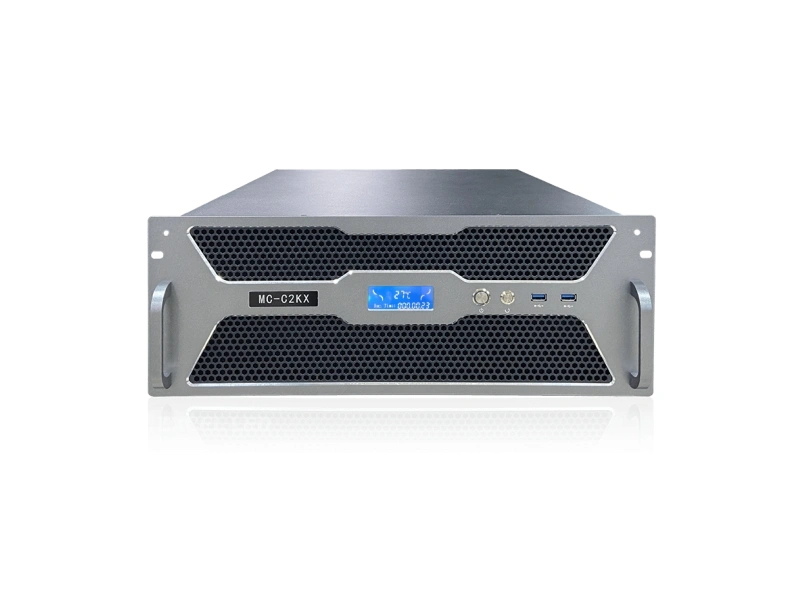
MC-C2 Multimedia Server at a Glance
What is it? A professional multimedia playback and control server on an industrial motherboard in a 4U rack chassis — the content brain for large and creative LED displays, distributed factory-direct by Excelled Display.
What does it output? Up to 4 DP outputs at 4096×2160@60Hz each — four independent 4K canvas segments that reach the LED wall pixel-to-pixel through the display drive chain.
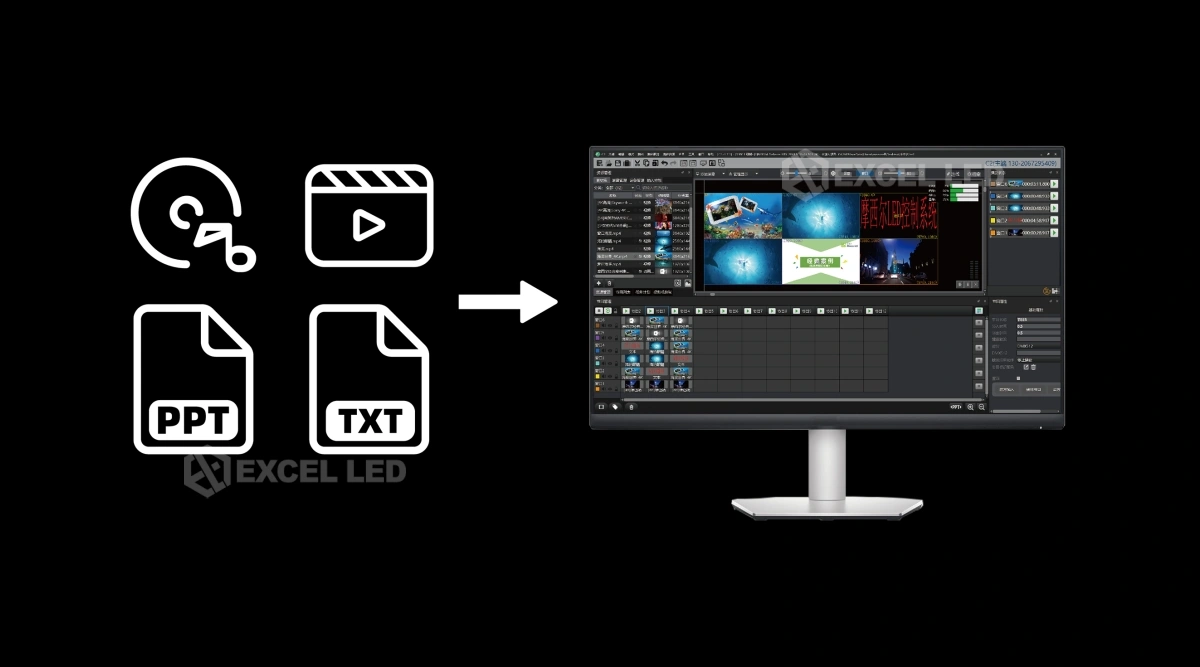
What can it play? Video, images and text with scheduled task playback; player software decodes media formats up to 8K resolution with timeline editing, unlimited layers and effects.
How is it managed? Programs preview in advance and device output is monitored in real time; power on/off scripts automate the day; iPad and central-control protocols manage scenes.
Who is it for? Museums and exhibitions, creative brand displays, data operation centers, conference halls and broadcast environments that outgrow small Android player boxes.
Why Big Creative LED Walls Need an MC-C2 Class Server, Not a Small Player
A dome or sphere canvas is not one 4K picture — it is several mapped segments, each rotated and warped to its surface, all playing in lockstep. Small Android players top out around a few million pixels and one canvas; the MC-C2 renders up to four 4K@60 segments from one industrial server, so a horn, dome or multi-surface installation runs as one scheduled program instead of several loosely-synced boxes.
The difference from a consumer or box player shows in operations. The MC-C2 runs professional playback and control software on Windows 10 Enterprise with pre-view before it hits the wall, real-time output monitoring, scheduled tasks, power on/off scripts and backup mode — the toolkit an integrator needs to hand a venue a display that runs itself, with central control and iPad management layered on for the operator.
Four 4K Outputs
Up to 4× DP at 4096×2160@60Hz — four independent segments, one synchronized canvas.
Any-Format Playback
Player software decodes video formats up to 8K resolution; timeline mode with unlimited layers.
Rotation & Shapes
Arbitrary image rotation and seamless splicing across displays of different shapes and angles.
Capture-Ready
Optional capture cards take up to 8× 2K or 4× 4K signals; NDI network streams supported.
MC-C2 Outputs: Four DP 4K@60 Channels with Online Synchronization
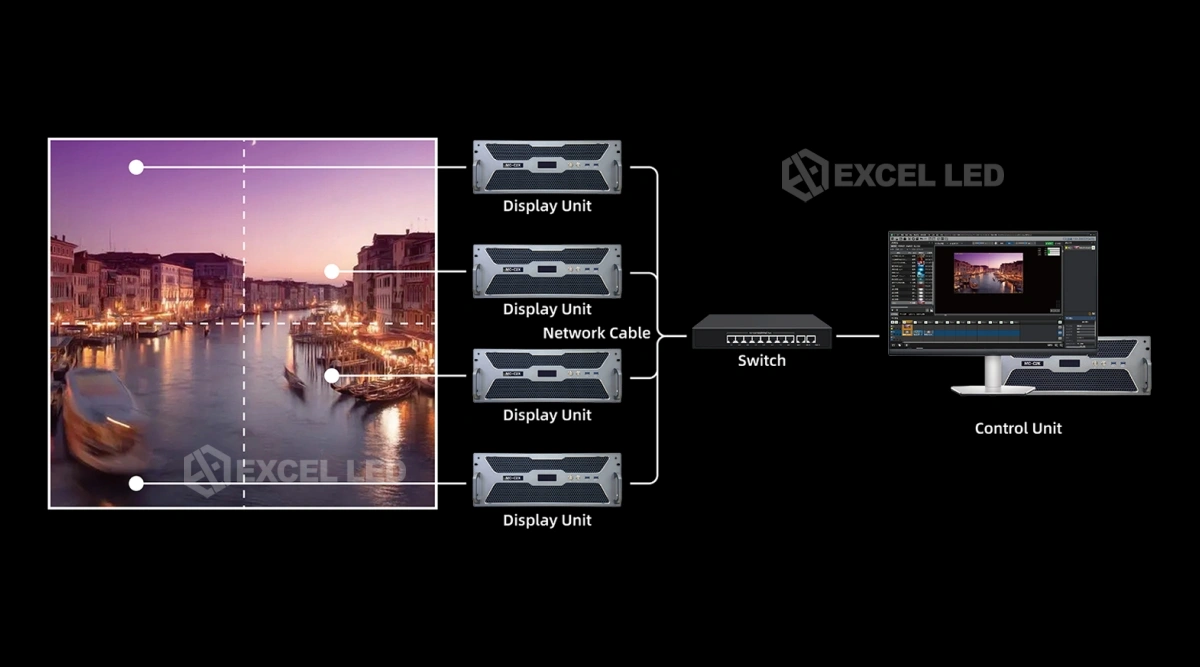
The display stage determines how a server must output. LED walls — and especially segmented creative surfaces — ask for discrete high-resolution canvases that can be driven pixel-to-pixel, which is exactly what the 4× DP output stage delivers: each channel runs up to 4096×2160@60Hz, and each output can be addressed as its own canvas region or combined into one larger composited picture across the outputs.
Segment boundaries are where cheap systems tear. The MC-C2 software performs online synchronization across the output screens to keep them strictly in step without tearing — the moving light on a dome stays continuous across the seam between two outputs. Because the outputs are DisplayPort signals, the chain downstream is the sending stage you already spec: each DP segment feeds a sending controller or processor that turns it into gigabit ports for receiving cards, and output canvases are matched to that stage’s load at configuration time.
MC-C2 Playback and Control Software: Timelines, Preview, Monitoring
The server’s value lives as much in software as in hardware. The MC-C2 multimedia playback and control platform covers the content lifecycle end to end: scheduled task playback runs planned programs on time; content previews are checked in advance; device output is monitored in real time; and power on/off scripts automate playback around venue hours. That combination is what lets a museum or brand space run for months without a technician touching the rack.
For the demanding player role, the MC-C2PX software tier adds the creative arsenal: timeline-mode editing with unlimited layers, polygonal slicing, grid templates and geometric transformation switching; effects such as flash, blur, borders and marquee; virtual screens for camera splicing, close-ups, live streaming and irregular-screen playback effects; preview mode that checks other programs without touching the live output; multi-point geometry correction and overall color-gamut unification; and decoding of video formats up to 8K resolution.
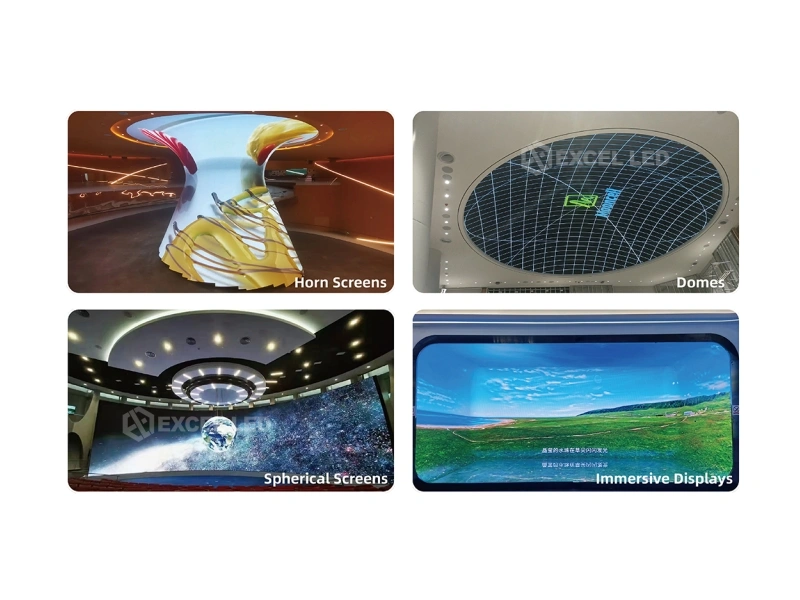
Horn, Dome and Sphere LED Screens: Rotation and Seamless Multi-Surface Splicing on the MC-C2
Creative LED shapes are usually a set of flat cabinets arranged on a curved or faceted surface, which means the content must be rotated, edged and aligned per surface before it ever reaches the wall. The MC-C2 supports arbitrary rotation of images and seamless splicing of displays with different shapes and angles — a portrait strip beside a landscape panel, a curved horn wrapping a column, panels meeting at an angle — all rendered as one design in the software rather than fought at the processor.
This is the class of installation where a media server earns its place over stacked Android boxes: one content design, one schedule, one output sync for the whole sculpture. Exhibition and brand teams also pair it with capture: an optional capture card or NDI stream brings a live camera or show feed into the same design that plays the ambient loop, switched by scene.
MC-C2 Capture Options and Interface Bank: NDI, Capture Cards, USB, Audio
Live content and server content share the same canvas when capture is in place. The MC-C2 accepts external signal capture through NDI network streams and optional capture cards: a 4-port HDMI capture card (with SDI, DVI, VGA, YPbPr or CVBS input options per configuration) supports up to 8 channels of 2K or 4 channels of 4K capture at a maximum of 4096×2160@60Hz. Audio rides with the design — the system offers stereo XLR output and the player tier supports multi-channel audio.
| Interface | QTY | Capability |
|---|---|---|
| DP outputs | 4 | Up to 4096×2160@60Hz each; display-end models ship DP 1.2×4 with a professional graphics card. |
| Capture (optional) | up to 4 | HDMI capture card with SDI / DVI / VGA / HDMI / YPbPr / CVBS options; up to 8× 2K or 4× 4K capture; NDI network capture supported. |
| USB | many | 2× USB 3.0 front; rear illustration shows 4× USB 3.0, 4× USB 2.0 plus Type-C×1 — quantities vary by configuration. |
| Network / serial | 2 | RJ45 LAN (gigabit-class; 2.5 GbE port shown on rear panel); COM serial optional — speeds and presence vary by configuration. |
| Audio | 3 | Line in/out and microphone interface; S/PDIF optical digital output; stereo XLR out with player software supporting 5.1 / 7.1 channel output. |
| Display extras | opt. | Integrated-graphics DP and HDMI outputs to a control monitor; 4× Mini DP display outputs on project-optional configurations; EDID management supported. |
| Power | 1 | 100–240 V AC, 50/60 Hz inlet with power switch; front power button. |
MC-C2 Variants: Control-End, Display-End, Both — and the PX Player Tier
Mooncell ships the MC-C2 platform as task-specific variants so you pay for the role the server plays. All share the same industrial chassis foundation — Intel Core CPU, 16 GB DDR4, 500 GB SSD and Windows 10 Enterprise — differing in output stage and software role.
| Variant | Role | Hardware Outputs |
|---|---|---|
| MC-C2K | Control-end server — scene control and scheduling for a display chain | HDMI 1.4 ×1 |
| MC-C2X | Display-end server — plays and renders content to the wall | DP 1.2 ×4 |
| MC-C2KX | Control & display-end — both roles in one server | DP 1.2 ×4 |
| MC-C2PX | Multimedia player software tier — timeline editing, effects, 8K decode | By variant — “X” denotes output channel count |
Common to the range: professional graphics card, EDID management, 500 GB SSD, Intel Core processor, 16 GB DDR4, stereo XLR audio and Windows 10 Enterprise, with an integrated-graphics path for the operator monitor. Specific configurations can vary per project — the quote sheet is the final authority.
MC-C2 vs MB400S vs V Series: Choosing the Content Brain for a Display
Three Mooncell devices serve different levels of “what plays the wall.” The table follows the published specs; the decision follows the project’s content and source complexity.
| Decision Row | MC-C2 ☆ | MB400S | V Series |
|---|---|---|---|
| Device type | Multimedia server (4U rack) | Network player + sending, compact box | Modular video splicer |
| Outputs | Up to 4× DP, 4096×2160@60 each | 2× GbE to receiving cards | 40–200× GbE to receiving cards |
| Pixel scope | ≈35.4M canvas across outputs (illustrative) | 1.3M px | 26M–130M px |
| Content engine | Win10 Enterprise software; playback to 8K; unlimited layers (PX) | Android 7.1; H.265 4K decode | Signal routing — no content engine |
| Creative shapes | Rotation, angle splicing, virtual screens | Sphere/ring walls to 1.3M | Irregular splicing of routed signals |
| Capture | Optional cards (8× 2K / 4× 4K) + NDI | HDMI in (sync mode) | Plug-in input boards up to 160× 2K |
| Backup / control | Backup mode, iPad + central control, scripts | Cloud cluster, apps | Input hot backup, Web scenes |
| Typical fit | Museums, brand flagships, big creative canvases | Retail spheres, fleets | Command / data-center live walls |
Related reading: MB400S network player-controller · V Series video splicer · M40 2-in-1 processor for the box-level display chain.
MC-C2 Installations: Museums, Brand Spaces, Data Floors, Studios
Museums and Exhibition Centers
Immersive rooms combine curved screens, projection surfaces and interactive cameras on tight schedules. The MC-C2 plays scheduled exhibits, previews new content without halting the show and lets a tablet switch scenes — the operating pattern of modern exhibition floors.
Creative Brand Flagships — Horn, Dome, Sphere and Angle Displays
Flagship stores build identity around shaped LED sculptures. Arbitrary image rotation, seamless multi-angle splicing and virtual screens map one continuous design across the sculpture’s surfaces, with capture ready for live in-store moments.
Data Operation and Conference Centers
Operations floors and conference halls split between scheduled dashboards and live presentations. Scheduled task playback runs the daily dashboards; preview and output monitoring verify what is actually on the wall; central control protocols hand the scene to the room system.
Broadcast and Studio Environments
Studio walls demand pixel-accurate playback and repeatable scenes. The server’s geometry correction and color-gamut unification keep multiple surfaces visually consistent on camera, and online synchronization keeps output segments seam-free during panning shots.
MC-C2 Buying Guide: 5 Checks Before You Spec a Multimedia Server
- Count surfaces, not just pixels. A dome with four mapped segments is four output regions even at moderate resolution; list every display surface and its segment resolution, then map segments to the four DP outputs — surfaces beyond four need a second server or a splicer-driven architecture.
- Choose the variant by role. Pure playback wall → display-end (C2X) or combined (C2KX) with DP 1.2×4; control-only rooms → C2K with its single HDMI 1.4 output; creative playback software features come with the PX tier — match the tier to the content team’s needs, not the demo reel.
- Plan capture at quote time. If live cameras or NDI streams enter the canvas, the capture card and its input type (HDMI, SDI, DVI, VGA, YPbPr, CVBS) must be on the configuration — retrofitting capture later means a chassis visit and a new card slot.
- Size the downstream drive chain. Each 4K@60 output needs a sending stage that can carry its pixels to receiving cards — confirm the sending controller or processor per segment (and its per-port load rules) so the server’s canvas promise survives the conversion.
- Specify the operations workflow. Confirm scheduled playback, preview and backup-mode behaviors with the venue operator, and which control surface rules — iPad app, central control protocol (TCP/UDP), or both — before commissioning, since operator habits decide whether the system runs hands-free.
Price and Cost Factors
MC-C2 pricing follows configuration — variant (K/X/KX), player software tier, capture cards and optional outputs — so a quote needs the surface list and capture plan. Compare honestly against the lighter alternatives: an MB400S-class player-controller covers small content walls for a fraction of the hardware budget; the server pays back when the canvas count, resolution and operating demands outgrow what a box can schedule and render.
MC-C2 Multimedia Server Technical Specifications
| Parameter | Specification |
|---|---|
| Product type | Multimedia playback and control server on an industrial motherboard; configurations vary by project |
| Variants | MC-C2K (control-end, HDMI 1.4×1) · MC-C2X (display-end, DP 1.2×4) · MC-C2KX (control & display, DP 1.2×4) · MC-C2PX player software tier |
| Video outputs | Up to 4× DP, max 4096×2160@60Hz per channel; professional graphics card; integrated-graphics DP/HDMI to operator monitor (optional) |
| Playback engine | Windows 10 Enterprise; player software decodes media up to 8K resolution; timeline mode with unlimited layers (PX); scheduled task playback; power on/off scripts |
| Capture (optional) | 4× HDMI capture card (SDI / DVI / VGA / HDMI / YPbPr / CVBS options); up to 8 channels 2K or 4 channels 4K, max 4096×2160@60Hz; NDI network stream capture |
| Synchronization | Online synchronization across output screens without tearing; backup mode for redundancy and fail-over |
| Creative display | Arbitrary image rotation; seamless splicing across different shapes and angles; multi-point geometry correction; color-gamut unification; virtual screens for cameras, close-ups, live streaming and irregular displays |
| Hardware core | Intel Core CPU; 16 GB DDR4; 500 GB SSD; EDID management supported |
| Control | iPad control for centralized management; central control protocols (TCP/UDP) for scene switching and playback; content preview and real-time output monitoring |
| Audio | Stereo XLR output; S/PDIF optical out; line in/out with microphone; player supports 5.1 / 7.1 channel output |
| Interfaces | 2× USB 3.0 front; 4× USB 3.0 + 4× USB 2.0 + Type-C×1 per rear illustration; RJ45 LAN (2.5 GbE shown on rear panel); COM serial optional |
| Operating voltage / humidity | 100–240 V AC, 50/60 Hz / 30–75% RH |
| Chassis | 4U industrial control server chassis |
| Dimensions (W×D×H) | 482 × 450 × 178 mm |
| Packaging / gross weight | 580 × 520 × 260 mm / 14.5 kg |
Mooncell MC-C2 Multimedia Server FAQ
Q1 What is the Mooncell MC-C2 multimedia server?
The MC-C2 is Mooncell’s multimedia playback and control server on an industrial motherboard in a 4U rack chassis. It plays scheduled video, image and text content through up to four DP outputs and manages large and creative LED displays, paired with Mooncell’s playback and control software.
Q2 How many outputs does the MC-C2 have and at what resolution?
Up to four DP outputs, each supporting a maximum of 4096×2160@60Hz. Display-end variants ship DP 1.2×4 on a professional graphics card; a control-end variant uses a single HDMI 1.4 output; and integrated-graphics outputs can serve the operator monitor.
Q3 What sizes of LED screen can the MC-C2 drive?
Each DP output is one 4K-class canvas segment, so the practical screen size is set by the sending stage downstream: one output per display surface is the typical topology, with up to 35.4M pixels of combined output canvas when all four run at full resolution (illustrative).
Q4 Does the MC-C2 need a separate computer?
No. The MC-C2 is itself a server running Windows 10 Enterprise with an Intel Core processor, 16 GB DDR4 and a 500 GB SSD. Content is prepared in the management software, and automatic startup with scheduled playback lets the unit run without a workstation attached.
Q5 Which MC-C2 variant should I choose — C2K, C2X or C2KX?
Choose MC-C2K for a control-end role (single HDMI 1.4 output), MC-C2X for a display-end role that renders to the wall through DP 1.2×4, and MC-C2KX when one server must control and display. The MC-C2PX tier adds timeline editing, unlimited layers and 8K decode to the player.
Q6 What content formats can the MC-C2 play?
Videos, images and text are supported through the playback software, which decodes video formats up to 8K resolution. Timeline-mode editing supports unlimited layers with effects such as flash, blur, borders and marquee, plus grid templates and geometric transformation switching.
Q7 Can the MC-C2 synchronize multiple screens without tearing?
Yes. The software performs online synchronization to keep output screens strictly in step without tearing — the mechanism that keeps moving content continuous across segment boundaries on domes, horns and multi-surface installations.
Q8 Can the MC-C2 take live camera or external signals?
Yes, through two paths: optional capture cards (up to 8 channels of 2K or 4 channels of 4K at up to 4096×2160@60Hz, with HDMI, SDI, DVI, VGA, YPbPr or CVBS input options) and NDI network stream capture, so live feeds join the scheduled design.
Q9 How does scheduling and monitoring work on the MC-C2?
Programs play on scheduled task playback with power on/off scripts for automatic control around venue hours. Content can be previewed in advance, and device output is monitored in real time, so operators verify what is actually on the wall without disrupting the live show.
Q10 Does the MC-C2 offer backup for reliability?
Yes. The MC-C2 offers a backup mode for redundancy and fail-over, so a standby path can carry the program if the primary unit or output fails — the reliability story large museums and command spaces spec alongside scheduled operation.
Q11 How is the MC-C2 controlled in an installation?
Through iPad control for centralized management of devices in exhibition halls, and through central control protocols using TCP/UDP for scene switching, screen playback and related functions — so the venue’s room system or AV control surface can drive the wall.
Q12 What are the MC-C2’s dimensions and hardware specifications?
The 4U industrial chassis measures 482×450×178 mm with a 580×520×260 mm pack at 14.5 kg gross. Core hardware is an Intel Core CPU, 16 GB DDR4, 500 GB SSD and a professional graphics card on Windows 10 Enterprise, running on 100–240 V AC at 30–75% RH — configurations vary by project.
MC-C2: The Server-Class Brain for Creative LED Walls
Mooncell MC-C2 multimedia servers bring server-class rendering and operations to displays that box players cannot carry — up to four DP 4K@60 outputs, rotation and multi-angle splicing for horn, dome and sphere screens, scheduled playback with preview and monitoring, capture and backup — configured per project by Excelled with the drive chain matched to every output.
Related reading: Mooncell MB400S player-controller · Mooncell V Series video splicer · Mooncell MTB2000E sending controller · Request a quote