
Mooncell MB401 LED Media Player
network media player · HDMI 2.0 4K out · multi-window · cloud cluster
Digital signage, advertising screens and showroom displays run on content that changes weekly — and needs to look rich while doing it. The Mooncell MB401 is the compact networked media player for that job: an HDMI 2.0 4K output, H.265 hardware decoding and multi-window playback up to 1080P×6 or 4K×2, managed from phones, tablets and the cloud — distributed factory-direct by Excelled, your LED display control-system partner.

MB401 LED Media Player at a Glance
What is it? A networked media player with an HDMI 2.0 4K output from Mooncell — the player that feeds monitors, LCD walls and LED video processors their content. Mooncell’s own specification sheet documents it as the MP401; Excelled supplies it under the MB401 naming.
What screens does it drive? Anything with an HDMI input: monitors and LCD screens directly, and LED walls through a video processor or sending stage — its maximum canvas is 3,840 px wide or 2,160 px tall at 4K.
How much content power? H.265 hardware decoding handles 4K@60 video sources; playback supports up to 4K×2, 1080P×6, 720P×10 or 360P×20 video windows with overlay and full OSD control.
How is it managed? Programs and parameters update from PCs, phones, tablets or the cloud platform; USB flash drives update offline; scheduling, timing power and auto brightness run centrally.
Who is it for? Advertising media, digital signage, exhibition halls and showrooms that need rich, remotely managed playback on a compact box.
What an HDMI-Output Player Does That a Sending Controller Cannot
Every screen needs a source before it needs a drive. Sending controllers and 2-in-1 processors route and scale video, but the content itself has to come from somewhere — and for signage that somewhere must play on schedule, update over the network and rebuild itself for the next campaign. The MB401 is that source: a small, low-power Android player that outputs one clean HDMI 2.0 4K signal and does all the scheduling around it.
Its place in a Mooncell system is defined by that single HDMI output. Plug it into a monitor or LCD screen and it is a complete digital signage terminal; plug it into an LED video processor and it becomes the program source for an LED wall — the processor does scaling, splicing and pixel drive, while the MB401 handles multi-window composition, scheduling and remote management. Compared with the all-in-one MB400S player-controller, the MB401 trades LED outputs for a richer pure-player role with a bigger media engine.
HDMI 2.0 Output
One 4K HDMI 2.0 output to monitors or LED video processors; 3,840-wide or 2,160-tall canvas.
Multi-Window
Up to 4K×2, 1080P×6, 720P×10 or 360P×20 video windows, freely sized and overlaid.
Cloud Cluster
Programs deploy to a screen fleet over internet, LAN or Wi-Fi — no site visits per campaign.
Multi-Screen Sync
Several players show the same program in step — the retail-rollout pattern across a store group.
MB401 Interfaces: HDMI 2.0 4K Output, 100M LAN, USB 3.0, Wi-Fi Antenna
Interface layout follows the player’s two duties — output video, receive content. An HDMI 2.0 output carries 4K video (maximum width 3,840 pixels or height 2,160 pixels) to a monitor or an LED video processor. One 100Mbps Ethernet port handles program release and terminal control, a USB 3.0 port and a USB 2.0 port accept drives plus Android-compatible keyboards and mice, the Wi-Fi antenna port strengthens wireless reach, and Reset restores factory settings. Power enters through the DC 12 V connector (5.5×2.1 mm) with a 12 V/2 A adapter supplied.

MB401 Multi-Window Playback: 4K×2, 1080P×6, 720P×10, 360P×20
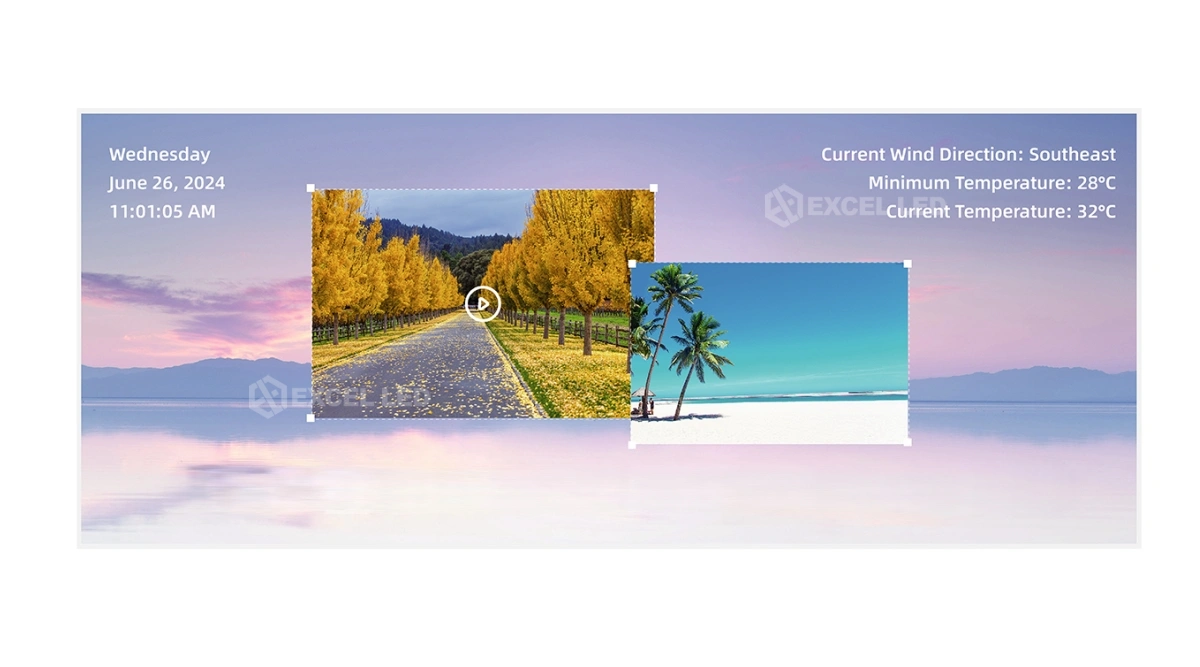
A signage screen is rarely one video — it is a main spot, a promo strip, a clock, a weather card and a logo. The MB401’s playback engine partitions the canvas accordingly: windows adjust freely in size and position with overlay capability, and video windows scale up to 4K×2, 1080P×6, 720P×10 or 360P×20 simultaneous streams — the published decoding budget that determines how busy a layout can get before quality drops.
Media coverage spans the signage playbook: video (MPG, MOV, MP4, FLV, MKV), audio (MPEG-1 Layer III, AAC), images (JPG, PNG, GIF), single-line, static and multi-line TXT, and image partitions for video, scrolling captions, LOGO, and data and time. A true-color OSD shows at any position in video/graphic hybrid mode with fully transparent, opaque and semi-transparent effects, and media content extends to documents, clocks, streaming media, web pages, weather, timers and discount windows — all served on the unit’s quad-core platform with 4 GB RAM, 64 GB eMMC storage and Android 11.

MB401 Terminal Management: Apps, Wireless Control and Central Scheduling
Day-to-day operation of a signage fleet lives in management, not playback. The MB401 manages programs, playback and system parameters from PC, Android, iOS and other smart-terminal devices — with wireless control covering real-time brightness adjustment, display switching, system parameter configuration and program playback control, plus wireless program transmission. Brightness itself adjusts automatically by time or ambient light, and scheduled programs with centrally configured timing playback and power on/off match the screens to trading hours without staff.
Two playback modes matter for retail rollouts. Offline playback keeps the program running when the network drops, and multi-screen synchronized playback keeps several players showing the same content in step across a store group — the two sides of a deployment that must survive both no-network moments and fleet-wide campaigns.

MB401 Cloud Cluster Control: One Platform for Every Screen in the Network
When signage means dozens of screens across malls or regions, per-unit updates do not scale — cloud management does. The MB401 supports remote cluster control over internet, LAN and Wi-Fi connections: programs and parameters are managed from a platform that reaches every registered player, so a new campaign or a changed price board publishes to the fleet instead of a technician visiting each screen. The same network stack supports USB flash drive plug-and-play for offline sites — carry the content, plug it in, done.

MB401 vs MB400S vs MC-C2: Picking the Player That Fits the Screen Plan
Mooncell’s three content players split by output type and scale. Specs follow the published sheets; the decision is about what stands downstream of the player.
| Decision Row | MB401 ☆ | MB400S | MC-C2 |
|---|---|---|---|
| Device type | Network media player (compact box) | Player + LED sending in one box | Multimedia server (4U rack) |
| Outputs | 1× HDMI 2.0, 4K | 2× gigabit to receiving cards | Up to 4× DP, 4096×2160@60 |
| Drives panels directly? | No — via processor / sending | Yes — up to 1.3M px | No — via drive chain |
| Media engine | Quad-core, 4 GB, 64 GB, Android 11 | Octa-core, Android 7.1, H.265 4K | Intel Core, 16 GB, Win10, 8K decode |
| Video windows | 4K×2 / 1080P×6 / 720P×10 / 360P×20 | Multi-window partitions | Unlimited layers (PX tier) |
| Management | Cloud cluster, apps, USB update | Cloud cluster, apps | iPad + central control (TCP/UDP) |
| Multi-screen sync | Yes | Yes | Yes (online sync) |
| Power | DC 12 V, 15 W | DC 12 V, 15 W | AC 100–240 V, 4U server |
| Typical fit | Signage, LCD walls, LED via processor | Sphere/ring LED ≤1.3M, PC-free | Museums & big creative canvases |
Related reading: MB400S player-controller · MC-C2 multimedia server. To drive LED walls from the MB401’s HDMI output, the processor step belongs in the chain — the M40 2-in-1 is the compact bridge. Send your screen type and player count and we’ll map the configuration.
Where the MB401 Fits: Digital Signage, Advertising, Exhibitions, Showrooms
Advertising Media and Digital Signage
Advertising screens sell on freshness — new creatives, new promos, weather and time woven in. The MB401’s multi-window engine composes spots with data cards and discount windows, and cloud cluster control publishes the refreshed layout across the media network without site visits.
Exhibition Halls and Showrooms
Showrooms switch content with the visitor — a product film, then a spec page, then a promo. A tablet controls the MB401 through Android and iOS apps, real-time brightness matches the room lighting, and scheduled playback returns the screen to its default loop when the demo ends.
Retail Information Displays
Storefront and in-store info screens live on clock, weather, timer and scrolling-caption content with a promotional window on top. One design plays across the store group in synchronized playback, while timing power on/off and auto brightness keep the screens aligned with trading hours and daylight.
MB401 Buying Guide: 5 Checks Before You Deploy Signage Players
- Map every screen to its drive chain. LCD and monitors take the MB401’s HDMI output directly; each LED wall needs a video processor or sending stage between the player and the panels — count those stages before counting players, and confirm the processor’s input accepts the 4K signal the player sends.
- Budget the windows per layout. Count simultaneous videos in your busiest design against the published budget — 4K×2, 1080P×6, 720P×10 or 360P×20. Designs heavier than the budget belong on a server-class engine, not this box.
- Choose the management pattern per site. Online sites join cloud cluster control over internet, LAN or Wi-Fi; offline sites rely on USB flash-drive plug-and-play updates. A hybrid fleet is normal — set the update path per screen before quoting the service contract.
- Specify the deployment behaviors. Confirm which screens run synchronized playback as a group, which run independent schedules, and whether timing power on/off and auto brightness are centrally configured — these are management-system settings, and they decide how hands-free the rollout really is.
- Verify the OS and peripheral needs. The unit runs Android 11-compatible firmware with quad-core CPU, 4 GB RAM and 64 GB storage; USB ports accept Android-compatible keyboards and mice for kiosk-style interactions — confirm the touch/peripheral plan against the terminal hardware.
Price and Cost Factors
MB401 pricing scales with quantity — single units for showrooms, fleet pricing for media networks and retail rollouts — and the honest comparison is against cheaper signage sticks with weaker decode budgets or costlier mini-PCs that need licensing and maintenance per seat. On power draw the math favors the player: 15 W rated at 12 V per signage terminal versus a PC-class source, across screens that run all day.
MB401 LED Media Player Technical Specifications
| Parameter | Specification |
|---|---|
| Product type | Networked media player with HDMI 2.0 4K output; documented by Mooncell as MP401 (Commercial LED Display Controller Series, V4.0) |
| Video output | 1× HDMI 2.0 output, 4K display; max width 3,840 px or max height 2,160 px; connects to monitors or LED video processors |
| Decoding | H.265 hardware decoding for 4K@60Hz video sources; 1080p60 H.265/H.264; 4K H.264 / H.265 / VP9 60fps video decoder |
| Hardware | Quad-core CPU; 4 GB DDR3 RAM; 64 GB eMMC flash storage; compatible with Android 11 |
| Multi-window playback | Freely adjustable window size and position with overlay; video windows up to 4K×2 / 1080P×6 / 720P×10 / 360P×20 |
| Media content | Video, images, text, documents, clock, streaming media, web pages, weather, timers, discount windows |
| Formats | Video MPG / MOV / MP4 / FLV / MKV; audio MPEG-1 Layer III / AAC; images JPG / PNG / GIF; single-line, static and multi-line TXT |
| Partition & OSD | Video, image, scrolling caption, LOGO, data and time partitions; true-color OSD at any position, video/graphic hybrid, full / semi-transparent / opaque effects |
| Management | PC, Android, iOS and smart-terminal device management; remote cluster control via internet, LAN and Wi-Fi; wireless control of brightness, display switch, parameters and playback |
| Scheduling | Scheduled-program playback; timing power on/off with central configuration; automatic brightness by time or ambient light; RTC display and management |
| Updates | USB flash-drive content plug-and-play; network transmission from management terminals; multi-screen synchronized playback |
| Network / I/O | 100 Mbps Ethernet input; Wi-Fi (antenna port included); USB 3.0×1 + USB 2.0×1; Reset key |
| Rated voltage / power | DC 12 V (5.5 × 2.1 mm connector) / 15 W rated |
| Working temperature / humidity | −20–60 °C / 0–80% RH, no condensation |
| Storage temperature | −40–80 °C |
| Dimensions (W×D×H) | 153 × 166.25 × 40 mm |
| Net weight | 0.524 kg |
| Packing / gross weight | 305 × 245 × 85 mm / 1.02 kg (single unit) |
| In the box | Ethernet cable, Wi-Fi antenna, HDMI cable, 12 V/2 A power adapter, certificate of conformity |
Mooncell MB401 LED Media Player FAQ
Q1 What is the Mooncell MB401 LED media player?
The MB401 is Mooncell’s networked media player with an HDMI 2.0 4K output, built for commercial displays and digital signage. Mooncell’s own specification sheet documents the same player as the MP401; both names refer to one product, which Excelled supplies as the MB401.
Q2 What screens can the MB401 drive?
Any display with an HDMI input: monitors and LCD screens directly, and LED walls through a video processor or sending stage, since the unit has one HDMI output rather than LED network ports. Maximum canvas is 3,840 pixels wide or 2,160 pixels tall.
Q3 Can the MB401 drive LED receiving cards directly?
No. The MB401 outputs HDMI 2.0 video for monitors or LED video processors, as the official specification states. For an LED wall that must run content directly to receiving cards without a processor, Mooncell’s MB400S player-controller is the matching device.
Q4 What video resolutions can the MB401 output and decode?
Output is 4K through HDMI 2.0 with a maximum width of 3,840 or height of 2,160 pixels. Hardware decoding covers 4K H.264, H.265 and VP9 at 60fps plus 1080p60 H.265 and H.264, so 4K@60 video sources play smoothly.
Q5 How many windows can the MB401 play at once?
Video windows scale up to 4K×2, 1080P×6, 720P×10 or 360P×20 simultaneous streams, with freely adjustable window size and position and overlay capability. Image, scrolling-caption, LOGO and clock partitions compose on top of the video canvas.
Q6 What content formats does the MB401 support?
Video in MPG, MOV, MP4, FLV and MKV; audio in MPEG-1 Layer III and AAC; images in JPG, PNG and GIF; single-line, static and multi-line TXT. Content also includes documents, clocks, streaming media, web pages, weather, timers and discount windows with true-color OSD overlay.
Q7 What are the MB401’s hardware specifications?
A quad-core CPU with 4 GB DDR3 RAM and 64 GB eMMC flash storage, running Android 11-compatible firmware. The box measures 153×166.25×40 mm at 0.524 kg, rated 15 W from a 12 V DC supply, working from −20 to 60 °C.
Q8 How do programs update on the MB401?
Two paths: USB flash-drive content plug-and-play for offline sites, and network transmission from management terminals for online ones. Programs and parameters can also be pushed through the cloud cluster platform over internet, LAN or Wi-Fi connections.
Q9 Does the MB401 support scheduling and automatic brightness?
Yes. Scheduled-program playback runs content on time, timing power on/off matches venue hours with central configuration through the management system, and screen brightness adjusts automatically based on time or ambient light levels, with wireless real-time adjustment available.
Q10 Can several MB401 players play in sync?
Yes. The MB401 supports multi-screen synchronized playback, so a fleet of players can show the same program in step across a store group or media network — alongside offline playback that keeps programs running when the network connection drops.
Q11 How is the MB401 managed and controlled?
Through PC, Android, iOS and other smart-terminal devices with management software apps, plus cloud cluster control for fleets. Wireless control covers real-time brightness adjustment, display switching, system parameter configuration, program playback control and wireless program transmission.
Q12 How much does the MB401 cost and what is in the box?
Pricing scales with quantity — single units for showrooms, fleet pricing for media networks; contact Excelled for a quote. The box includes an Ethernet cable, Wi-Fi antenna, HDMI cable, 12 V/2 A power adapter and certificate, packed at 305×245×85 mm, 1.02 kg gross.
MB401: The Managed Signage Player Behind the Screen
Mooncell MB401 (documented as MP401) is the compact, low-power media player for digital signage and commercial displays — HDMI 2.0 4K output, H.265 hardware decoding with multi-window budgets up to 1080P×6, cloud cluster management, synchronized fleet playback and central scheduling — supplied factory-direct by Excelled with the drive chain matched to your screens.
Related reading: Mooncell MB400S player-controller · Mooncell MC-C2 multimedia server · Mooncell M40 2-in-1 processor · Request a quote