
Mooncell V Series Video Splicer
modular LED wall splicer · 3U to 14U · 26M to 130M px · 4K@60 input
When control rooms outgrow a single box, Mooncell’s V Series is the modular rack splicer that scales with the wall: 40 to 200 gigabit outputs driving 26–130 million pixels straight into Mooncell receiving cards, with 4K@60 inputs and 4:4:4 processing — configured card-by-card and distributed factory-direct by Excelled, your LED display control-system partner.

V Series Video Splicer at a Glance
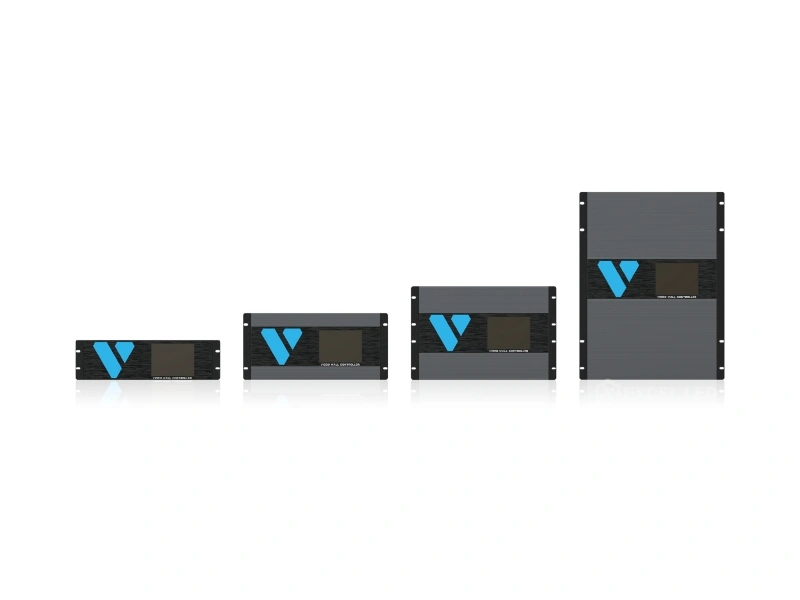
What is it? Mooncell’s modular video wall splicer family in four rack chassis — V300 (3U), V500 (5U), V700 (7U) and V1400 (14U) — that takes many digital and analog signals and drives LED walls directly through gigabit network outputs.
How large a wall can it drive? From 26M pixels on 40 ports (V300) to 130M pixels on 200 ports (V1400), each port carrying up to 650,000 pixels at 8-bit color to Mooncell receiving cards.
How many sources? 2K, 4K@30 and 4K@60 inputs on plug-in boards — DVI, HDMI 1.3/1.4/2.0, DP 1.2, VGA and 3G-SDI — up to 160× 2K-class channels in the largest chassis.
What does it do with them? Arbitrary layering across up to 160 layers, multi-screen roaming and scaling, irregular-splicing support, frame synchronization, EDID management and Web-based scene control — with input hot backup and redundant power options.
Who is it for? Command and dispatch centers, conference and reporting halls, data operation centers, exhibition venues and broadcast studios with demanding multi-source walls.
Why a Rack-Mount V Series Splicer Instead of More Box Processors
Every extra live source and every added row of cabinets pushes a wall past what a compact processor can hold — and chaining several boxes multiplies cabling, EDID conflicts and failure points. The V Series is Mooncell’s answer for that scale: one chassis, one control seat, and a card-slot architecture where input boards, output boards and redundant power all live under one roof. Channels, ports and spare slots are bought per project instead of per box.
The output stage is what makes it a splicer rather than a switcher: each 10-port output card connects directly to Mooncell receiving cards over gigabit Ethernet, so the wall needs no sending controllers between the rack and the cabinets. Input processing, layering, scaling and pixel drive happen in one device, and a wall that later gains cabinets or sources grows by adding boards — not by buying a new processor.
One Rack, Huge Walls
26M to 130M pixels across four chassis sizes — drive grows by adding output boards and power.
Source Density
Up to 160× 2K inputs via mixed DVI, HDMI, DP, VGA and 3G-SDI boards in the V1400.
Signal Fidelity
4K@60 sources pass through 4:4:4 color processing with sharp scaling for large screens.
Scene Control
Web-based control with saveable PC scenes, EDID management and per-input cropping.
V Series Modular Chassis: Gigabit Output Cards That Drive Panels Directly
Chassis choice is a scale decision first. V300 (3U) ships 40 gigabit ports for 26M pixels; V500 (5U) 60 ports for 39M; V700 (7U) 100 ports for 65M; and V1400 (14U) 200 ports for 130M. Each output card contributes 10 RJ45 gigabit ports, and every port connects straight to Mooncell receiving cards — the card’s duty split by the controller across the wall’s cabinet wiring.
Per-port limits decide how a canvas divides. A port carries up to 650,000 pixels at 8-bit color depth, with a maximum width of 1,920 pixels and a maximum height of 1,920 pixels per port — so walls are sliced into 1,920-pixel-wide columns and sub-650k strips, exactly as the configuration software lays them out. The same port in 10-bit HDR10 operation carries up to 480,000 pixels, and only the first 8 ports of a 10-port output card are driven.
V Series Input Cards: DVI, HDMI 1.3/1.4/2.0, DP 1.2, VGA and 3G-SDI Options
Inputs arrive on plug-in boards, so a V-Series chassis carries the mix a project actually needs and leaves empty slots for growth. Single cards offer 4 or 8 ports of one signal family; 2K boards handle standard sources while 2× HDMI 2.0 and 2× DP 1.2 boards take 4K@60 plus unusual tall or ultra-wide formats — 3840×2160@60, 4096×2160@60, a 1920×4800 vertical strip and a 7680×1080 ultra-wide canvas are all listed input formats.
| Input Card | Ports | Signal Capability |
|---|---|---|
| 4× DVI-D | 4 | VESA DVI-D digital only; max 2048×1152@60Hz; EDID customizable. |
| 4× HDMI 1.3 | 4 | Max 2048×1152@60Hz per port; EDID customizable. |
| 8× HDMI 1.3 | 8 | Max 2048×1152@60Hz per port; YCbCr 4:2:2 color processing on this card. |
| 4× HDMI 1.4 | 4 | 3840×2160@30Hz or 3840×1080@60Hz; EDID customizable. |
| 2× HDMI 2.0 | 2 | 3840×2160@60 / 4096×2160@60 / 1920×4800@60 / 7680×1080@60; max width 7680 px, max height 4800 px; HDMI 1.4/1.3 backward compatible via EDID. |
| 2× DP 1.2 | 2 | Same 4K@60, 1920×4800@60 and 7680×1080@60 formats; DP 1.1 backward compatible. |
| 8× VGA | 8 | VESA analog, up to 1920×1080@60Hz — the path for legacy computer sources. |
| 4× 3G-SDI | 4 | ST-424 (3G) / ST-292 (HD) / SMPTE 259 SD sources; max 1920×1080@60Hz; 1080i / 576i / 480i deinterlacing. |
Board mix determines how many sources a chassis accepts: the V300 tops out at 36× 2K, 24× 4K@30 or 6× 4K@60 channels; the V1400 at 160× 2K, 80× 4K@30 or 40× 4K@60 — a mix, not a simultaneous triple maximum, so the input plan should be matched to the slot budget.
Layering, Free Roaming and Frame Synchronization Across the V Series Wall
Once sources are in, the V Series treats the whole canvas as one surface. Any window can layer above any other, roam across screen regions and scale freely; layer counts scale with the chassis from 32 (V300) to 160 (V1400). That is the multi-window grammar command rooms live on — maps, cameras and data feeds arranged and re-arranged without touching panel wiring.
Two display duties matter for the odd wall shapes in this class. Irregular and intelligent irregular splicing let creative layouts — angled, curved or segmented surfaces — address only the cabinets they occupy, and frame synchronization keeps every output region aligned for the wall as one coherent image. Signal quality is handled in the same engine: 4:4:4 color processing preserves the full color information of 4K@60 and lower sources, and HDMI audio input travels with its video for walls that carry sound downstream.
V Series Control and Backup: Web Scenes, EDID Management, Hot Backup, Redundant Power
Operator workflow decides whether a 130M-pixel wall is manageable, so the V Series puts Web-based control at the center: scenes are created on a PC, saved as scene files and recalled as presets — the same layout every morning, the event layout during the show. Deeper management follows the source path: EDID can be customized per input so every source reports the resolution you want, signal cropping and local zoom trim camera feeds before they enter the canvas, and intelligent resolution setting allows different resolutions between network ports as the wall’s cabinet runs demand.
Reliability is engineered at both ends of the signal. Input hot backup keeps a spare source standing by to take over when the primary drops, and the larger chassis add redundant power: the V500 and V700 run dual 550 W supplies and the V1400 four 550 W supplies (V300 runs a single 204 W supply), with fan cooling throughout and a 110–240 V AC operating range. A front-panel LCD reports device status at the rack — no laptop required for a first look.

The Four V Series Chassis: V300, V500, V700, V1400
V300 — 3U, 26M px: The Wall Splicer That Fits a Rack Bay
Forty gigabit ports, 26M pixels and up to 36× 2K or 6× 4K@60 inputs in a 133 mm-tall chassis at 7.8 kg. The V300 is the entry to the V Series — the model for mid-size control rooms whose input count or pixel load has already passed what a compact 2-in-1 processor can hold, without yet needing power redundancy in the rack.
V500 — 5U, 39M px: Dual-Power Step-Up
Sixty ports drive 39M pixels from up to 48× 2K or 12× 4K@60 inputs, and the chassis adds redundant 550 W×2 power — the reliability tier command and dispatch centers spec when a wall outage is not an option. 222.5 mm tall, 13.7 kg.
V700 — 7U, 65M px: The Large-Wall Workhorse
One hundred ports carry 65M pixels — a 65M ceiling that covers very large single walls — fed by up to 80× 2K or 20× 4K@60 sources across 80 layers. Dual 550 W supplies back it in a 310 mm chassis at 15.0 kg.
V1400 — 14U, 130M px: The Flagship Rack
Two hundred ports, 130M pixels, up to 160× 2K or 40× 4K@60 inputs across 160 layers — and four 550 W supplies for a 30.0 kg, 662.3 mm chassis that anchors the biggest command and data-center walls in the V Series range.
V300 vs V500 vs V700 vs V1400: Scaling the Wall, Not Replacing the System
The four chassis share one card architecture, so migration is upward, not sideways. Choose by pixel load first, then input density, then power redundancy — rows follow the published specification.
| Scale Check | V300 | V500 | V700 | V1400 |
|---|---|---|---|---|
| Chassis | 3U | 5U | 7U | 14U |
| Gigabit outputs | 40 ports | 60 ports | 100 ports | 200 ports |
| Max pixel load | 26M | 39M | 65M | 130M |
| Max input channels | 36× 2K / 6× 4K@60 | 48× 2K / 12× 4K@60 | 80× 2K / 20× 4K@60 | 160× 2K / 40× 4K@60 |
| Max layers | 32 | 48 | 80 | 160 |
| Redundant power | No (204 W) | 550 W ×2 | 550 W ×2 | 550 W ×4 |
| Dimensions (W×D×H) | 482.6×315×133 mm | 482.6×315×222.5 mm | 482.6×315×310 mm | 482.6×438×662.3 mm |
| Chassis weight | 7.8 kg | 13.7 kg | 15.0 kg | 30.0 kg |
| Typical fit | Mid walls, 3U bay | Rooms needing PSU backup | Very large single walls | Biggest command & data centers |
Related reading: Mooncell MVB12E 2-in-1 processor (the larger all-in-one box option) · M40 2-in-1 processor. Not sure which tier a project needs? Send the source list and wall pixel count and we’ll map the chassis.
V Series Video Splicer Technical Specifications
| Parameter | Specification |
|---|---|
| Models / chassis | V300 (3U) · V500 (5U) · V700 (7U) · V1400 (14U) — modular 19″ rack chassis |
| Output | 10× RJ45 gigabit ports per output card, direct to Mooncell receiving cards; 40 / 60 / 100 / 200 ports per chassis; single-port load 650,000 px at 8-bit (480,000 px at 10-bit HDR10; first 8 ports of the card used in that mode); per-port max width 1,920 px / max height 1,920 px |
| Max pixel load | 26M (V300) / 39M (V500) / 65M (V700) / 130M (V1400) pixels |
| Max input channels | V300: 36× 2K, 24× 4K@30 or 6× 4K@60 · V500: 48 / 24 / 12 · V700: 80 / 40 / 20 · V1400: 160 / 80 / 40 |
| Input boards | 4× DVI-D, 4× or 8× HDMI 1.3, 4× HDMI 1.4, 2× HDMI 2.0, 2× DP 1.2, 8× VGA, 4× 3G-SDI — board mix per chassis slot budget |
| Input formats | Up to 3840×2160@60Hz and 4096×2160@60Hz; vertical 1920×4800@60Hz and ultra-wide 7680×1080@60Hz on HDMI 2.0 / DP 1.2 boards; VGA to 1920×1080@60; SDI per ST-424 / ST-292 / SMPTE 259 |
| Layers | Arbitrary layering among all signals; 32 / 48 / 80 / 160 max layers per chassis; free roaming and scaling |
| Display functions | Irregular screen splicing, intelligent irregular splicing, frame synchronization, HDMI audio input |
| Color processing | 4:4:4 color processing; HDR10 (10-bit) operation supported on output stage |
| Control | Web control; PC scene files; EDID customization per input; source cropping and local zoom; intelligent per-port resolution setting |
| Backup / reliability | Input signal hot backup; redundant power (V500/V700: 550 W×2, V1400: 550 W×4); fan cooling |
| Supply voltage | 110–240 V AC, 50/60 Hz |
| Power consumption | 204 W (V300) / 550 W×2 (V500, V700) / 550 W×4 (V1400) |
| Dimensions (W×D×H) | V300 482.6×315×133 mm · V500 482.6×315×222.5 mm · V700 482.6×315×310 mm · V1400 482.6×438×662.3 mm |
| Chassis weight | V300 7.8 kg · V500 13.7 kg · V700 15.0 kg · V1400 30.0 kg (±0.5 kg tolerance) |
V Series Installations: Command Centers, Conference Halls, Data Floors, Studios
Command and Dispatch Centers
Maps, cameras and telemetry on one wall, many operators on one scene. The V Series’s 32–160 layers, input hot backup and redundant power are the features dispatch teams spec first — the wall that carries the room’s decisions cannot flicker when a source or a supply drops.
Conference and Reporting Halls
Presentations, videoconferencing feeds and document cameras arrive as a mix of HDMI, DP and legacy VGA. One chassis ingests them all, applies per-input EDID so every laptop shows its best resolution, and recalls a “presentation” scene file at the touch of a preset.
Data Operation and Exhibition Centers
Operations floors split big dashboards across many cabinets, and exhibition centers run both data and creative content on the same displays. The V Series handles both duties from the same rack — dashboard scenes by day, immersive irregular-layout scenes using the same canvas at night.
Broadcasting Studios
Studio walls need broadcast-standard sources and zero tearing. 3G-SDI boards ingest camera and program feeds with deinterlacing for interlaced signals, and frame synchronization keeps the on-set wall coherent with the production’s timing.

V Series Buying Guide: Sizing Inputs, Pixels and Power Before the Quote
- Count sources as chassis channels. List every live input and classify it 2K, 4K@30 or 4K@60. Compare against the chassis maxima as a mix — e.g. a room with 20× 2K plus 4× 4K@60 sits inside the V300’s 36× 2K / 6× 4K@60 slot budget, with room to grow.
- Convert the wall to pixels and ports. Width × height of the full canvas; divide by 650,000 to find minimum ports, then check per-port width (≤1,920) and height (≤1,920) so the partition is legal. The chassis must offer that many ports and its load rating must cover the total.
- Choose the board mix for today — and the slots for tomorrow. Buy the input boards the project lists now; keep spare slots for the sources you expect in year two. HDMI 2.0/DP 1.2 boards are the ones to reserve for future 4K@60 feeds.
- Decide the reliability tier. If a wall outage stops operations, move up to the V500 or beyond for dual power supplies and plan an input hot-backup source. If the room tolerates brief interruptions, the V300’s single supply may be enough — spend the difference on spare boards.
- Confirm receiving-card compatibility and HDR plans. Outputs are wired to Mooncell receiving cards; if 10-bit HDR10 content is on the roadmap, remember the mode’s 480,000-px per-port ceiling and the 8-of-10-port card rule when sizing ports.
Price and Cost Factors
A V Series is priced by configuration — chassis, input boards, output boards and power tier — not by list model, so ask for a build-to-spec quotation with the input count and pixel load attached. Budget honestly against the alternatives: several compact 2-in-1 processors would need separate control seats, duplicate cabling and no shared backup, while one configured chassis consolidates them — the crossover usually lands in the multi-source, mid-size-wall range where the V300 competes.
Mooncell V Series Video Splicer FAQ
Q1 What is the Mooncell V Series video splicer?
The V Series is Mooncell’s modular video signal processing line in four rack chassis — V300 (3U), V500 (5U), V700 (7U) and V1400 (14U). It takes 2K and 4K sources from plug-in input boards and drives LED walls directly through gigabit outputs to Mooncell receiving cards, with layering, scaling and frame synchronization in one device.
Q2 How many pixels can the V Series drive?
The V300 drives 26 million pixels on 40 gigabit ports, the V500 39 million on 60 ports, the V700 65 million on 100 ports and the V1400 130 million on 200 ports. Each port carries up to 650,000 pixels at 8-bit color, up to 1,920 pixels wide and 1,920 pixels tall.
Q3 How many input sources can a V Series chassis take?
Maximums depend on the chassis and the mix: the V300 accepts up to 36× 2K, 24× 4K@30 or 6× 4K@60; the V500 48× 2K, 24× 4K@30 or 12× 4K@60; the V700 80× 2K, 40× 4K@30 or 20× 4K@60; and the V1400 160× 2K, 80× 4K@30 or 40× 4K@60 channels.
Q4 Which input boards are available for the V Series?
Plug-in cards cover 4× DVI-D, 4× and 8× HDMI 1.3, 4× HDMI 1.4, 2× HDMI 2.0, 2× DP 1.2, 8× VGA and 4× 3G-SDI. HDMI 2.0 and DP 1.2 boards accept 4K@60, a 1920×4800 vertical format and a 7680×1080 ultra-wide format.
Q5 Does the V Series connect directly to LED receiving cards?
Yes. Each 10-port output card feeds Mooncell receiving cards directly over gigabit Ethernet — no sending controllers between the splicer and the cabinets. The outputs are compatible with all Mooncell series receiving cards, and the controller partitions the wall into per-port strips automatically.
Q6 What does HDR10 and 10-bit output change on the V Series?
With HDR10 10-bit output enabled, each gigabit port carries up to 480,000 pixels instead of 650,000, and only the first 8 ports of a 10-port output card are driven. Factor the lower per-port ceiling into the port count when 10-bit content is planned.
Q7 How many layers can the V Series process?
Windows layer arbitrarily among all signals with free roaming and scaling. Maximum layers are 32 on the V300, 48 on the V500, 80 on the V700 and 160 on the V1400 — each window can be positioned, scaled and overlaid anywhere on the combined canvas.
Q8 Does the V Series support irregular LED screens?
Yes. The V Series supports irregular display splicing and intelligent irregular splicing, so creative layouts with angled, curved or segmented surfaces address only the cabinets they occupy, alongside frame synchronization that keeps the whole wall one coherent image.
Q9 How is the V Series controlled and configured?
Through Web-based control: scenes are composed on a PC, saved as scene files and recalled as presets. Per-input EDID customization, signal cropping and local zoom refine sources, and intelligent resolution setting allows different resolutions between network ports to match cabinet runs.
Q10 What backup does the V Series offer?
Input signal hot backup stands a spare source by to take over when the primary fails. The V500 and V700 run redundant 550 W×2 supplies and the V1400 runs 550 W×4; the V300 uses a single 204 W supply. Fan cooling covers heat across all chassis.
Q11 How do I choose between V300, V500, V700 and V1400?
Match pixel load first — 26M, 39M, 65M or 130M — then confirm the input mix fits the channel maximums and the ports fit the per-port rules. Move up a tier when the project needs redundant power or expects wall growth; boards and power scale within each chassis.
Q12 How much does a Mooncell V Series splicer cost?
V Series pricing is configuration-based — chassis, input boards, output boards and power tier — so the quote follows the source list and pixel count. Contact Excelled with the wall size, source types and reliability requirements for a factory-direct build-to-spec price.
V Series: The Modular Splicer That Scales to the Wall
Mooncell V Series video splicers move multi-source LED walls out of the box-processor class — 26M to 130M pixels through 40 to 200 gigabit outputs, plug-in 2K/4K@60 input boards, up to 160 layers and redundant power in 3U to 14U racks, configured per project by Excelled.
Related reading: Mooncell M40 2-in-1 processor · Mooncell MVB12E 2-in-1 processor · Mooncell MTB400E sending controller · Request a quote