
Mooncell MB400S LED Display Controller
network player + sending for sphere & circular LED screens · 1.3M px · PC-free
Mooncell’s all-in-one answer for irregular LED walls: an 8-core media player fused with a sending controller that plays 4K H.265 content and drives sphere, circular and ring screens up to 1.3M pixels — no computer as a video source — distributed factory-direct by Excelled, a trusted LED display manufacturer and control-system partner.
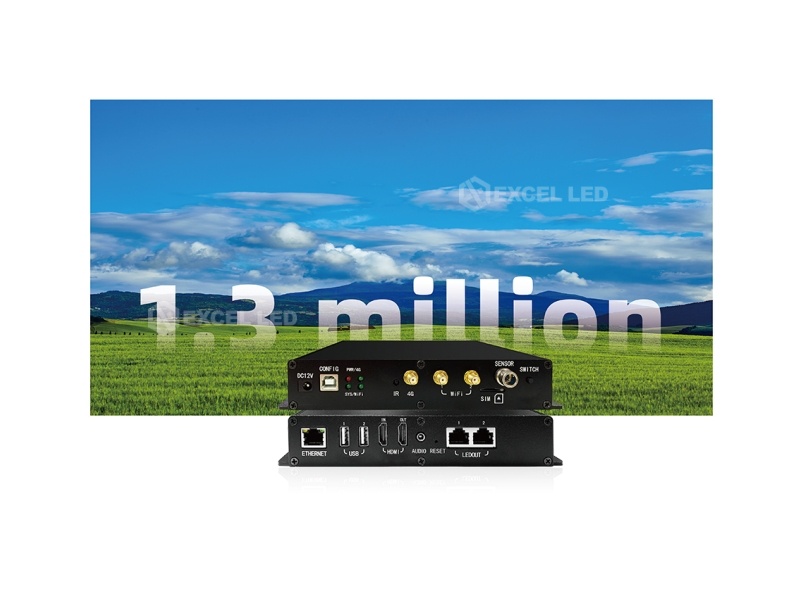
MB400S LED Display Controller at a Glance
What is it? A custom-built network player with an integrated sending controller for irregular-shaped LED displays — sphere screens, circular and ring displays — distributed factory-direct by Excelled Display.
How big a screen can it drive? Up to 1.3 million pixels over dual gigabit Ethernet outputs, with a maximum width of 3,840 pixels or height of 2,160 — sized for the slim, non-rectangular loads creative screens present.
Does it need a computer? No — and that is the point. Android 7.1 with H.265 4K hardware decoding plays video, images and TXT locally; an HDMI input with loop-out brings a live signal in when the moment calls for synchronous display.
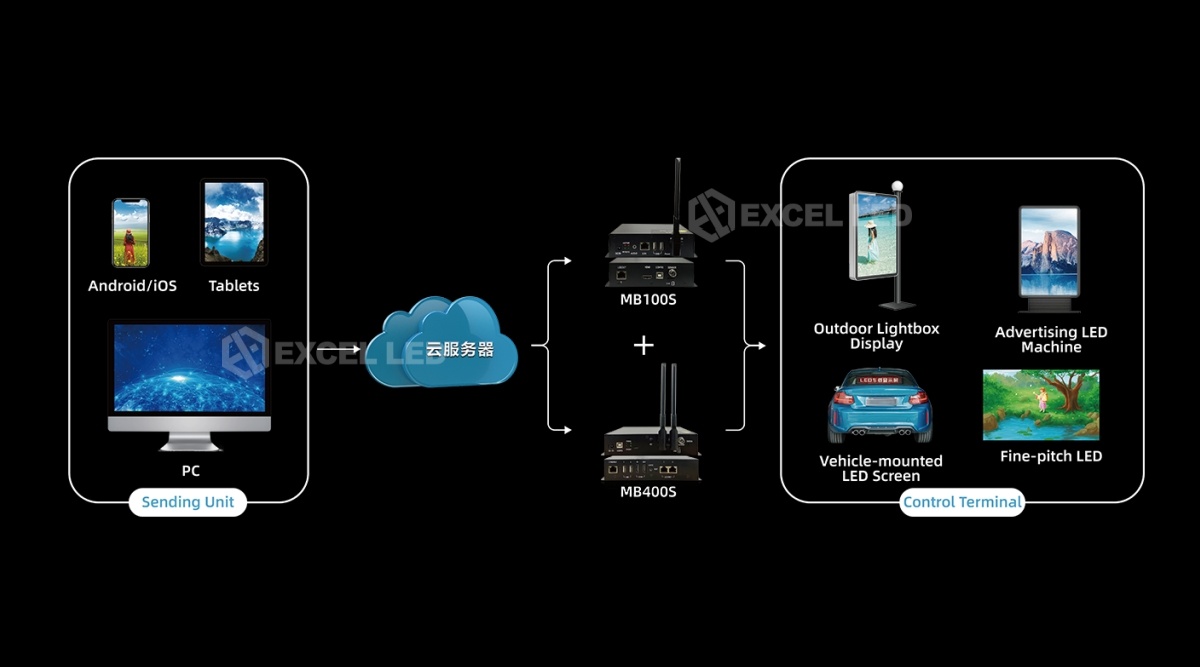
How is it managed? Cloud cluster control for program deployment without on-site debugging, plus PC, mobile and iPad access over LAN, Wi-Fi or optional 4G — including automatic and scheduled brightness.
Who is it for? Retail, brand and exhibition sphere and ring LED walls where a sending controller alone would still need a player, a PC and a site visit.
Why the MB400S Replaces a Sending Controller Plus a Separate Video Source
An irregular LED screen needs two things a plain sending controller does not provide: a content source that understands non-rectangular canvases, and a drive stage that partitions them efficiently. The MB400S is Mooncell’s way of delivering both without the usual two-box stack — an 8-core processor running Android 7.1 with H.265 hardware decoding sits in the same 193×139×33 mm box as the sending stage, so a sphere or ring wall plays its loop with no computer, no external player and no second power point.
That fusion changes the project math. Content updates travel as files — over the cloud platform, the LAN, or a USB stick plugged in on site — instead of a technician rebuilding a PC source. The HDMI input with loop-out keeps a synchronous path available: switch the unit to synchronous mode and it behaves as a conventional sending stage fed by a switcher or media server, passing the signal through to the next device.
PC-Free Playback
Android 7.1, octa-core CPU and H.265 4K hardware decoding run the content loop alone.
Irregular Drive
Dual gigabit outputs load sphere, circular and ring screens up to 1.3M pixels, 3,840 wide or 2,160 tall.
Cloud Cluster
Programs deploy across a screen fleet from the cloud — no on-site debugging for content changes.
Any Network
LAN, Wi-Fi (station or hotspot) and optional 4G keep the wall reachable wherever it hangs.
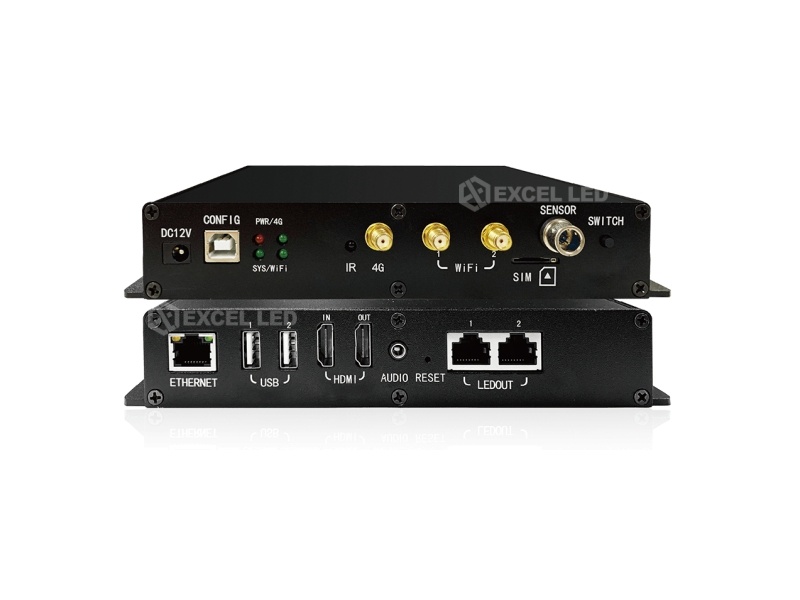
MB400S Interfaces: HDMI In and Loop-Out, Dual LED Outputs and the Full Network Bank
Rear and front panels split the duties cleanly. Two gigabit LED outputs feed receiving cards for the irregular load; HDMI IN accepts a live source and HDMI OUT loops it onward; USB 2.0 ×2 takes flash drives for plug-and-play updates; and a 3.5mm audio output serves sound. Networking runs 100M Ethernet, Wi-Fi (which can act as a hotspot) and an optional 4G module. The front panel adds a light-sensing probe interface and configuration keys.
| Interface | QTY | Capability |
|---|---|---|
| LED outputs | 2 | Gigabit Ethernet to Mooncell receiving cards; max 1.3M pixels; canvas to 3,840 wide or 2,160 tall. |
| HDMI input / output | 1+1 | HDMI IN for synchronous signal; HDMI OUT loop-through to the next device. |
| Network | 3 | 100M Ethernet + Wi-Fi (AP / station) + 4G module (optional, antenna included with kit). |
| USB | 2+1 | 2× USB 2.0 for flash drives and devices; USB Type-B CONFIG port for display parameters. |
| Sensor | 1 | Light-sensing probe interface; RS485 sensor interface monitors temperature, humidity and brightness. |
| Audio / power | 2 | 3.5mm (1/8″) TRS audio out; DC 12 V input, 5.5×2.5 mm connector; RESET restores factory settings. |
What the MB400S Plays: 4K H.265 Content, Partitions and True-Color Overlay
Creative screens live on layered content — a video across the sphere, a caption crawling over the top, a logo in the corner. The MB400S engine partitions the canvas as you wish: windows can be sized and positioned freely, overlaid on each other, with video, image and TXT playing together and superposed on the video in transparent, semi-transparent or opaque modes via true-color OSD. Playback covers common video, audio and image formats, plus single-line, static and multi-line TXT; RTC keeps clock and date content honest.
| Content Type | Support |
|---|---|
| Decoding | H.265 4K HD hardware decoding playback; H.264-era formats fully supported |
| Video formats | MP4, MPG, MKV, MOV, 3GP and similar container formats |
| Audio formats | MPEG-1 Layer III (MP3) and AAC |
| Image formats | JPG, PNG, GIF |
| Windows & OSD | Arbitrary window size and position, window overlay, true-color OSD at any position |
| Text & clock | Single-line, static and multi-line TXT; date/time; RTC display and management |
| Extras | Weather, scrolling captions, LOGO and data partitions |
Synchronous / Asynchronous Switching and HDMI Loop-Out on the MB400S
Most of the year a sphere or ring wall plays its own loop — that is asynchronous duty, and the built-in player owns it. On launch nights and live events, the same wall must show a live camera or presentation feed instantly. The MB400S handles both by switching between synchronous and asynchronous modes: flip to synchronous and the HDMI IN signal takes over the sending stage, with HDMI OUT looping the signal onward to the next device in the chain.
Multi-screen venues add one more requirement: synchronized playback across several walls. The MB400S supports multi-screen synchronized display, so several units showing the same content stay aligned — the pattern brand-showroom projects use when one loop runs across several spheres and ring screens in one space. Precise timing is part of the same story: the unit supports NTP precise timing to keep every screen’s schedule on the same clock.
Automatic Brightness and Environmental Sensing on the MB400S
Retail spheres run from opening to closing, and their brightness must follow the day without staff touching a screen. The MB400S adjusts screen brightness automatically based on time or ambient light — the front-panel light-sensing probe interface connects the probe, and the RS485 sensor interface monitors environmental parameters such as temperature, humidity and brightness for walls whose surroundings matter to the venue’s systems.
Schedule discipline is built into the same controller: timed playback and timing power on/off match the wall to trading hours, NTP precise timing keeps the schedule honest, and the RTC clock covers power-on moments before the network settles. All of it runs on 15 W rated power across a −20 to 60 °C working range — the low-power, wide-temperature profile that lets the compact box live inside the sphere structure rather than in a conditioned rack room.
Cloud Cluster Control: MB400S Program Deployment Without On-Site Debugging
Sphere and ring walls usually belong to fleets — five stores, three malls, a campus — and fleet content changes weekly. Mooncell’s cloud cluster control management targets exactly that: programs deploy to screens over the network from a management seat, and the Android and iOS apps plus PC software handle device management, program playback control and real-time brightness adjustment from any smart terminal. The unit can even work as a Wi-Fi hotspot, giving the installer a direct link when the venue network is not yet live.
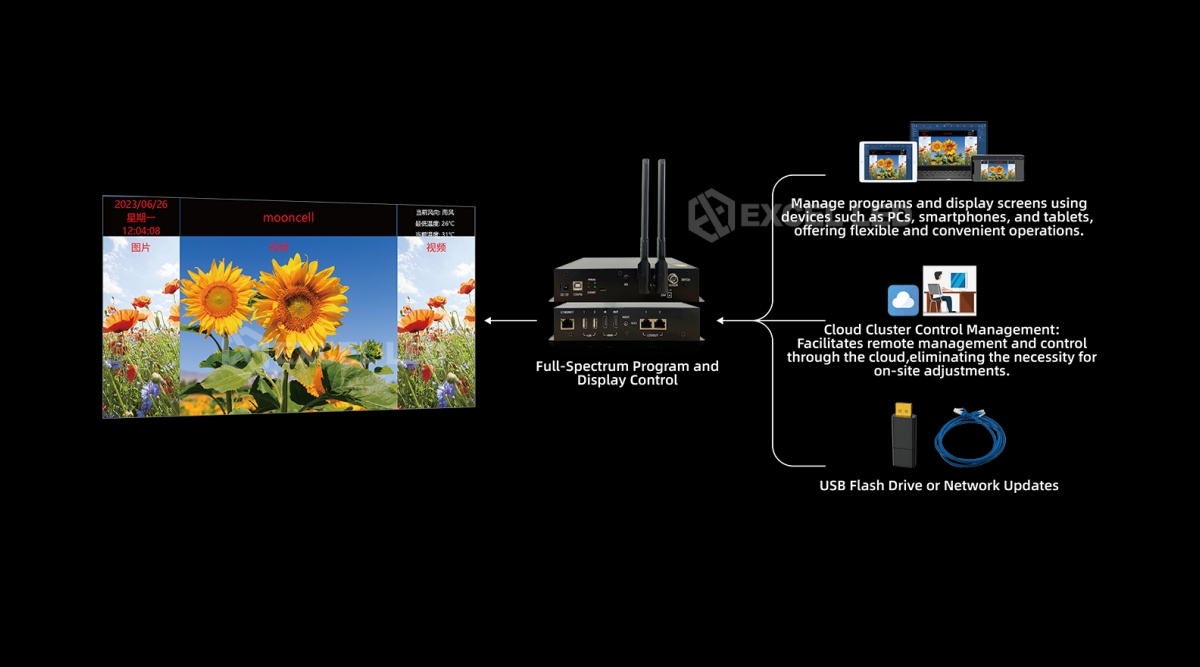
Program Scheduling and Offline Playback Management for the MB400S
Day-to-day operations live in the management software: build the program, schedule it, push it. The management software interface covers program scheduling, playback control and synchronized playback across the fleet — and when a site has no network at all, the USB flash drive path updates programs plug-and-play style: carry the content to the wall, plug it in, and the unit takes the update.
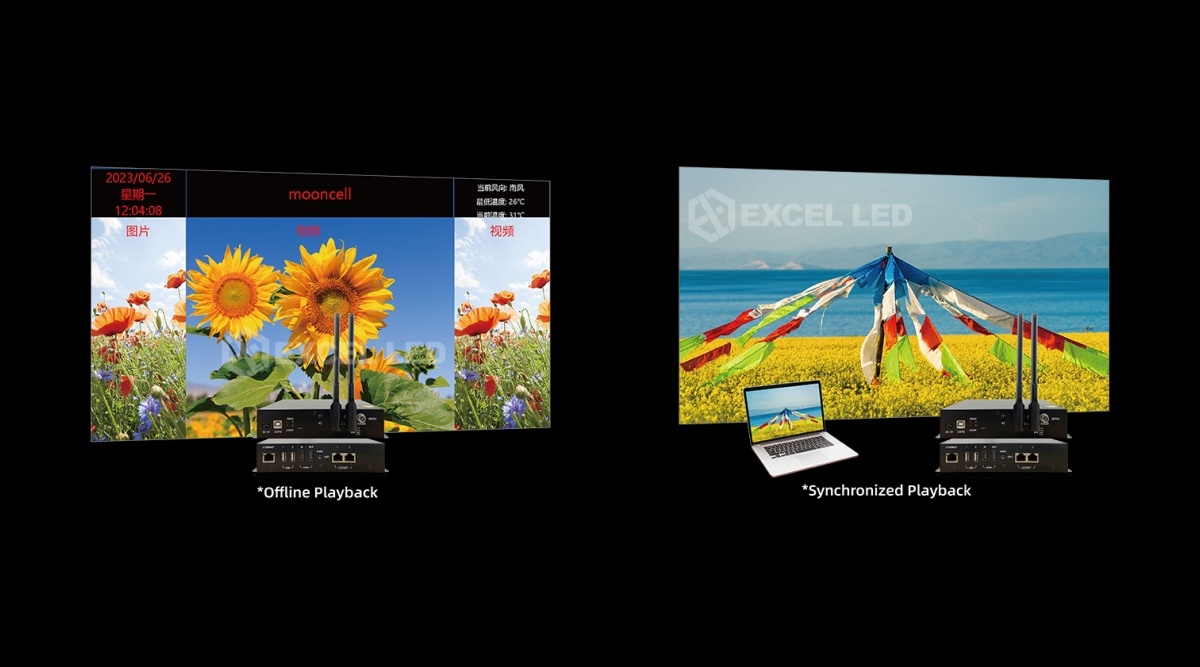
Where the MB400S Fits: Sphere, Ring and Multi-Location LED Walls
Retail and Brand Spheres & Ring Displays
Flagship spheres and escalator rings run one polished loop with a logo overlay and a date partition. The MB400S plays it locally on an 8-core engine, auto-dims by ambient light, powers down after closing — and updates overnight from the cloud when the campaign changes.
Multi-Location Chains: One Cloud Seat, Many Walls
When the same ring or curved screen ships to ten stores, the fleet story decides. Cloud cluster control pushes the approved program to every unit, apps verify each wall from a phone, and NTP keeps every store’s schedule on one clock — content changes that used to cost site visits now cost a publish click.
Exhibition and Event Spaces: Live When It Matters
A permanent sphere that doubles as a launch stage flips between modes: asynchronous playback daily, then synchronous mode with the HDMI IN feed for the event, looped out to the staging chain — then back to the loop the next morning. One box, no re-cabling.
MB400S vs B1200S: Integrated Player vs Pure Sphere Sending Controller
The two irregular-display controllers in Mooncell’s line solve different halves of the problem. Specs follow the published sheets; the buying decision is about content source, not just pixels.
| Model | MB400S ☆ | B1200S |
|---|---|---|
| Device type | Network player + sending controller | Pure sending controller |
| Typical screen role | Content-driven sphere & ring walls | Feed from PC / processor / server |
| Max load | 1.3M px | 7.8M px |
| LED outputs | 2 × gigabit | 12 × gigabit |
| Max canvas | 3,840 × 2,160 (dimension limits) | 7,680 × 4,096 |
| Input | HDMI in + HDMI loop-out | HDMI 2.0 / DP 1.2, 4K@60Hz |
| Playback | Android 7.1, H.265 4K HW decode | No — source is external |
| Cloud cluster control | Yes + Android / iOS apps | No (host-PC software) |
| Connectivity | LAN / Wi-Fi / optional 4G | USB, LAN, RS232 |
| Sensors | RS485 + light probe, auto brightness | — |
| Genlock / 3D | — | Genlock optional; active 3D |
| Power | DC 12 V, 15 W | AC 100–240 V, 70 W |
| Typical fit | Sphere/ring walls ≤1.3M, fleets, PC-free | Irregular walls 1.3M–7.8M, fed by source |
Related pages: B1200S sphere LED controller · MTB400E sending controller · MVB4S Pro 2-in-1 processor. Unsure which box a wall needs? Send the canvas size and content plan and we’ll recommend the configuration.
MB400S LED Display Controller Technical Specifications
| Parameter | Specification |
|---|---|
| Processor / memory / storage | Octa-core CPU; 2 GB DDR3 RAM; 8 GB eMMC storage |
| Operating system | Android 7.1 |
| Processing capacity | 1.3M pixels; max width 3,840 px, max height 2,160 px |
| Decoding | H.265 4K HD hardware decoding playback; MP4 / MPG / MKV / MOV / 3GP video, MP3 / AAC audio, JPG / PNG / GIF images, TXT and OSD overlay |
| LED outputs | 2 × gigabit Ethernet to receiving cards; supports Mooncell receiving cards |
| Video I/O | HDMI input + HDMI loop-out; 3.5mm audio output |
| Network access | 100M LAN; Wi-Fi AP / station; 4G module optional |
| Sensing | RS485 sensor interface (temperature / humidity / brightness); light-sensing probe interface; NTP precise timing |
| Control | Android / iOS apps, PC / mobile / tablet management, USB flash drive plug-and-play updates, RESET key |
| Rated voltage / power | DC 12 V (5.5 × 2.5 mm connector) / 15 W |
| Working temperature / humidity | −20–60 °C / 0–80% RH, non-condensing |
| Storage temperature | −40–80 °C |
| Dimensions (W×D×H) | 193 × 139 × 33 mm |
| Net weight | 0.56 kg |
| Packing / gross weight | 300 × 245 × 85 mm / 0.95 kg |
| In the box | Wi-Fi antenna, power adapter, USB cable, certificate; 4G module kit (module + antenna + mount) optional |
MB400S Buying Guide: 5 Checks Before You Choose a Player-Controller
- Size the load against the canvas. Total pixels must sit under 1.3M, with the screen’s widest row under 3,840 and tallest column under 2,160. Unfolded sphere drawings over that belong on the B1200S — don’t stretch one box past its drive.
- Decide who feeds content. Pure loop = asynchronous playback, files over cloud/LAN/USB. Live events = synchronous mode needs the HDMI IN feed and loop-out path. If live switching between several sources is the core job, a video processor belongs upstream.
- Choose the network plan per site. LAN where it exists, Wi-Fi station where it doesn’t, hotspot for commissioning, and the optional 4G module where no venue network will ever reach the wall — match the connectivity to the site before quoting.
- Specify the fleet workflow. Multi-location buyers should confirm the cloud cluster platform and app accounts cover their region and content-review flow — the controller is only as fast as the deployment workflow around it.
- Verify receiving cards and 3D/sync ambitions. The unit drives Mooncell receiving cards; if the project later wants active 3D or Genlock on the same irregular wall, that belongs to the B1200S-class controller — spec the sending stage for the future, not just the launch content.
Price and Cost Factors
MB400S pricing depends on quantity, the optional 4G module kit, and the fleet management seats that go with multi-wall projects. The honest comparison for budget is the two-box alternative — a sending controller plus an industrial player, two power supplies, two mounts — against this single unit plus its power adapter; on slim irregular walls the all-in-one usually wins on hardware and install labor before the cloud savings.
MB400S LED Display Controller FAQ
Q1 What is the MB400S LED display controller?
The MB400S is Mooncell’s network player with an integrated sending controller, custom-built for irregular LED displays such as sphere, circular and ring screens. It plays content locally on an Android 7.1 engine with H.265 4K hardware decoding and drives the screen through dual gigabit outputs — no computer needed as a video source.
Q2 How many pixels can the MB400S drive?
Up to 1.3 million pixels over two gigabit Ethernet outputs to Mooncell receiving cards. The canvas allows a maximum width of 3,840 pixels or a maximum height of 2,160 pixels — dimension limits that suit the slim, non-rectangular loads of sphere and ring displays.
Q3 Does the MB400S need a computer or external player?
No. An octa-core CPU with 2GB RAM running Android 7.1 plays 4K H.265 content, images and text directly. The HDMI input with loop-out provides a synchronous path for live signals when needed, and content updates arrive over the cloud, LAN or USB flash drive.
Q4 What content formats does the MB400S play?
Video formats such as MP4, MPG, MKV, MOV and 3GP; audio in MPEG-1 Layer III and AAC; images in JPG, PNG and GIF; plus single-line, static and multi-line TXT. Windows can be partitioned arbitrarily with overlay, and true-color OSD shows anywhere with transparent or opaque effects.
Q5 What are synchronous and asynchronous modes on the MB400S?
Asynchronous mode is normal playback: the unit plays its scheduled programs without any external signal. Synchronous mode switches the sending stage to the HDMI IN feed, so a live camera or presentation signal drives the wall, with HDMI OUT looping the signal onward to the next device.
Q6 How does cloud cluster control work on the MB400S?
Screens register with Mooncell’s cloud platform over LAN, Wi-Fi or optional 4G. Programs deploy from a management seat without on-site debugging, and Android/iOS apps plus PC software handle device management, playback control and real-time brightness adjustment across the fleet.
Q7 Can several MB400S screens play in sync?
Yes. The MB400S supports multi-screen synchronized display, so several units showing the same content stay aligned — the workflow for showrooms where one loop runs across multiple spheres and ring screens. NTP precise timing keeps every unit’s schedule on the same clock.
Q8 Does the MB400S control brightness automatically?
Yes. Screen brightness adjusts automatically based on time or ambient light levels. A front-panel light-sensing probe interface connects the probe, and an RS485 sensor interface monitors environmental parameters such as temperature, humidity and brightness for walls inside larger systems.
Q9 What scheduling does the MB400S support?
Programs play according to scheduled programs with timing playback, and the unit supports timing power on/off to match trading hours. NTP precise timing and the RTC clock keep schedules accurate, and updates can be deployed by network transmission or USB flash drive plug-and-play.
Q10 How is the MB400S connected to the network?
Three paths: 100M Ethernet, Wi-Fi in station mode, and an optional 4G module with its own antenna kit. The unit can also act as a Wi-Fi hotspot for direct commissioning when the venue network is not ready, and USB 2.0 ports accept flash drives.
Q11 MB400S vs B1200S — which controller fits my irregular screen?
Choose the MB400S for content-driven sphere and ring walls up to 1.3M pixels that should run PC-free with cloud management. Choose the B1200S when the same shapes exceed 1.3M up to 7.8M pixels and a player, processor or PC feeds it — or when Genlock and active 3D are on the spec.
Q12 How much does the MB400S cost and what is in the box?
Pricing depends on quantity and the optional 4G module kit; contact Excelled for a factory-direct quote. The box includes the MB400S, Wi-Fi antenna, power adapter, USB cable and certificate, at 0.56 kg net in a 300×245×85 mm pack.
MB400S: Player and Sending, Together, for Sphere LED Screens
Mooncell MB400S replaces the two-box stack on irregular LED walls — 8-core Android playback with H.265 4K decoding, dual gigabit drive to 1.3M pixels, HDMI in with loop-out, cloud cluster management and automatic brightness — shipped after Excelled’s compatibility check against your receiving cards.
Related reading: Mooncell B1200S sphere controller · Mooncell MTB400E sending controller · Mooncell M40 2-in-1 processor · Request a quote