
RGBlink M1 Multi-Window Processor
4 modular inputs · dual layers + DSK · multi-view preview · T-bar mixing
A vision-mixer-style multi-window processor with user-fit modular inputs, PIP with DSK and mask effects, and a dedicated multi-view preview — supplied by Excelled, a trusted LED display manufacturer and controller supplier for global B2B system integrators.
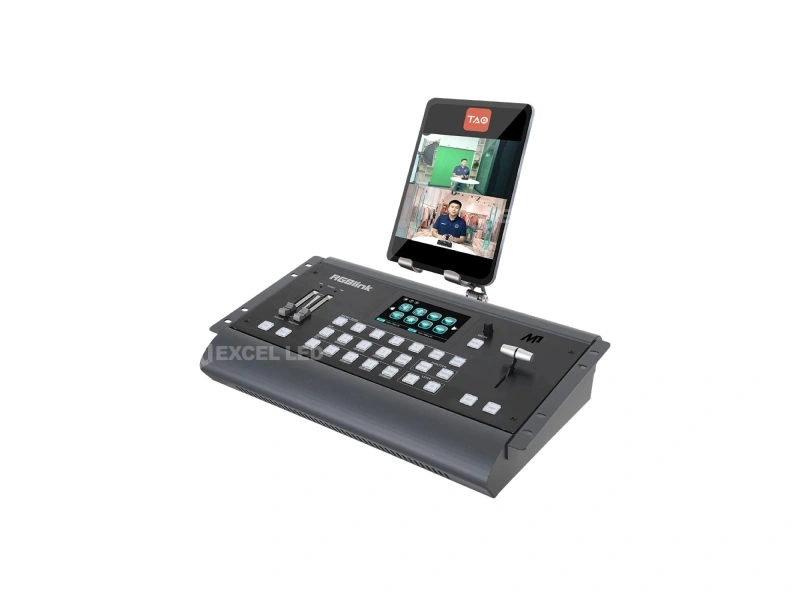
RGBlink M1 Multi-Window Processor at a Glance
What is it? The M1 is RGBlink’s vision-mixer-style multi-window processor — T-bar mixing, modular inputs and layered compositing for small stages and presentation environments, supplied factory-direct by Excelled Display.
How many inputs? Four user-fit modular inputs — HDMI, DVI-I, 3G-SDI (in/loop), USB (in/backup) or NDI (RJ45) modules; single-port modules ride on the EXT module carrier.
How does it compose? Two full video layers plus OSD/LOGO/STILL layers, PIP at any position with scale and crop, DSK/chroma key and edge-blend masks — mixed across 14 transition effects on a T-bar and TAKE button.
Who is it for? Conference and stage presenters, small event crews, lecture capture and any operator who wants real mixing controls instead of menu diving.
What is included? M1 console with touch screen, T-bar and illuminated buttons, modular I/O to order, XPOSE mobile app control — configure via our sales team.
Why the M1’s T-Bar Beats Menu-Driven Switching
Menu-driven switchers ask operators to page through screens mid-show; the M1 puts the cut on hardware: a familiar T-bar for fader-style transitions, large illuminated buttons, and a TAKE button for timed cuts across 14 digital transition effects. The dedicated multi-view preview shows PGM, PST, all four inputs and audio meters at once — the operator always sees the next shot before it lands.
Composition depth matches the surface: two full video layers plus additional OSD, LOGO and STILL layers, with PIP positioned, scaled and cropped freely, and foreground effects including built-in and custom masks, DSK/chroma key and variable edge blend that softens the PIP into the main image — graphics-grade compositing at presentation price.
Modular Inputs
Four user-fit modules — HDMI, DVI-I, 3G-SDI with loop, USB with backup, or NDI decode (NDI|HX) — standardised across the RGBlink range.
Layered Compositing
Two video layers plus OSD/LOGO/STILL layers, with masks, DSK/chroma key and edge blend on the foreground.
Transition Effects
Over a dozen wipes and digital effects, run from the T-bar or timed from the TAKE button.
Dedicated Preview
A dedicated HDMI multi-view output monitors PGM, PST, input sources and audio levels on one screen.
M1 Modular Inputs: HDMI, DVI, SDI, USB and NDI on User-Fit Cards
The input bay takes up to four single-port modules — choose per project from HDMI, DVI-I (compatible with DVI/VGA/YPbPr/CVBS), 3G-SDI with loop-through, USB 2.0 with backup, or the single NDI input module that decodes NDI|HX sources on the LAN. Single-port modules pair with the EXT module carrier (one EXT supports up to four single-port input modules).
| Input module | Ports | Capability |
|---|---|---|
| HDMI Module | 1 × HDMI-A | HDMI 1.3; VESA to 1920×1080@60; SMPTE 480i–1080p60. |
| DVI Module | 1 × DVI-I | DVI single-link, compatible with DVI/VGA/YPbPr/CVBS sources. |
| 3G-SDI Module | 2 × BNC (1 In | 1 Loop) | SMPTE 425M (A&B) / 424M / 292M / 259M-C; 1080p to 60 Hz with loop-through to downstream gear. |
| USB Module | 2 × USB (1 In | 1 Backup) | USB playback input plus backup port for repeatable media runs. |
| NDI Module (option) | 1 × RJ45 | Decodes NDI|HX sources at 720p/1080p up to 60 Hz (requires MONE EXT MB Suite). |
Standard variants map to common buys: M1 HDMI (quad HDMI in and out), M1 DVI (quad DVI in), and M1 (HDMI+SDI) (dual HDMI + dual SDI in) — with the EXT module, NDI module and wing sides available as add-ons.
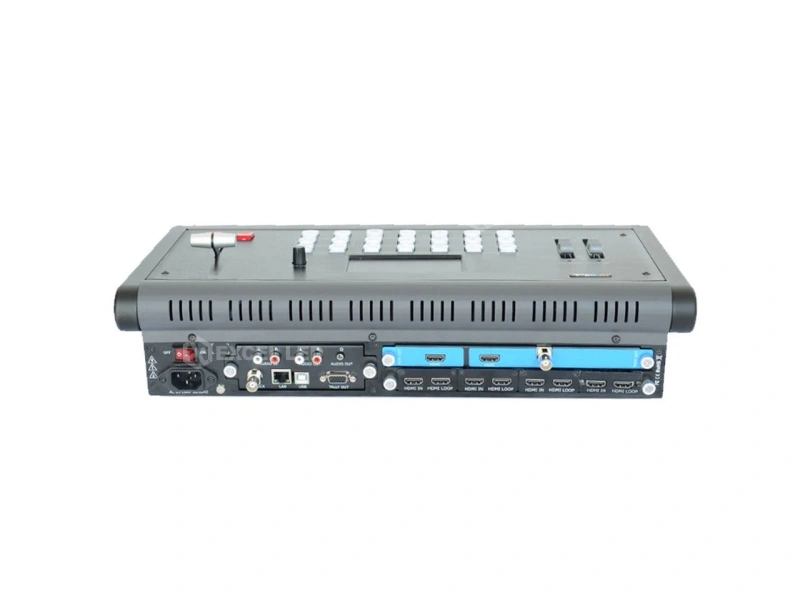
Scaled Output, Multi-View Preview and Genlock-Stable Mixing
The output slot feeds 2× HDMI-A with optional BNC SDI and USB 3.0 additions depending on the card chosen. Output resolution is set independently from input resolutions and scaled pixel-to-pixel — ideal for non-native LED canvases — with VESA up to 1920×1080@60 and SMPTE 1080p50/60 on HDMI.
| Output card | Ports | Role |
|---|---|---|
| PGM HDMI | PVW HDMI (Standard) | 2 × HDMI-A | Program plus dedicated multi-view preview — the standard show configuration. |
| PGM HDMI/SDI | PVW HDMI | 2 × HDMI-A | 1 × BNC | Adds an SDI program feed for broadcast and recording chains. |
| PGM HDMI/USB 3.0 | PVW HDMI | 2 × HDMI-A | 1 × USB-A | USB 3.0 output follows HDMI — streaming and recording over a single cable. |
| PGM HDMI/SDI/USB 3.0 | PVW HDMI | 2 × HDMI-A | 1 × BNC | 1 × USB-A | Full-stack card: program to HDMI, SDI and USB 3.0 at once. |
Stability and control round out the workflow: Genlock Y input (BNC) locks the M1 to house sync, PTZ VISCA cameras are controllable from the panel, presets save to an external USB disk, and the XPOSE mobile app mirrors control to a phone or tablet. LAN (RJ45) and Tally (DB15) complete the installation interfaces.
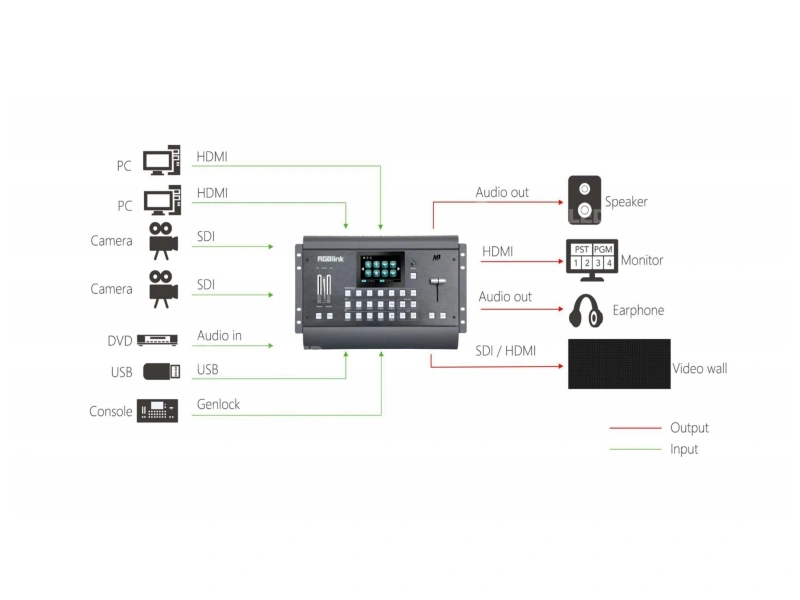
Where the RGBlink M1 Processor Earns Its Keep
Conference & Stage Presentation: PIP with Polish
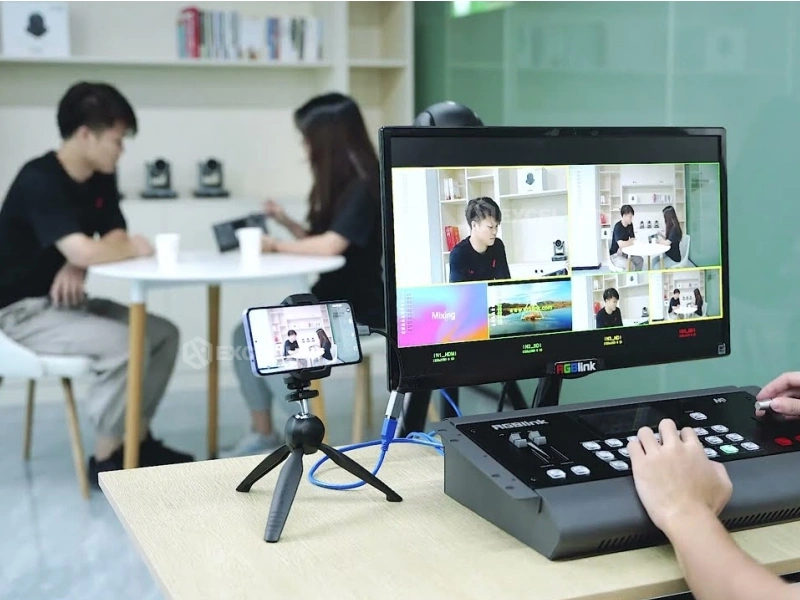
A presenter laptop and a camera mix on two layers; the PIP lands where the layout wants it, with masks and edge blend making the overlay sit in the picture rather than on it. The T-bar keeps transitions at the operator’s fingertips, even for volunteers.
Lecture Capture & Small Studios: One Surface, Everything Visible
Multi-view preview plus PPM audio meters mean one person monitors picture and sound on the same screen — presets recall scene layouts, and USB 3.0 output options feed streaming or recording rigs directly.
Small LED Walls: Pixel-to-Pixel to Non-Native Canvases
Output scaling matches odd LED canvas sizes pixel-to-pixel before the sending card, and Genlock keeps the wall stable next to camera feeds — a common ask in showrooms and small stages.
M1 vs mini-pro vs X2: Which RGBlink Tool Fits the Job?
Three RGBlink lines overlap on paper and diverge in practice. Specs below are taken from the published RGBlink specification sheets for M1, mini-pro v3 and X2.
| Model | M1 ☆ | mini-pro | X2 |
|---|---|---|---|
| Role | Vision mixer / multi-window processor | Streaming switcher | Modular splicing processor |
| Inputs | 4 modular single-port (HDMI/DVI/SDI/USB/NDI) | 4× HDMI 2.0 fixed | Up to 16 on quad cards |
| Layers | 2 video layers + OSD/LOGO/STILL, DSK, masks | 2 scalable layers | Splicing windows (16) |
| Operator surface | T-bar, TAKE, illuminated buttons, touch screen | Joystick + T-bar, 2.1″ screen | Front panel + XPOSE/T console |
| Preview | Dedicated multi-view (PGM/PST/sources/PPM) | Multi-view over HDMI | H.264 PVW output option |
| Max I/O resolution | 1080p60 | 4K60 in / 1080p out | 4K@30 in / 2048×1152 out |
| Sync | Genlock Y in | — | Genlock Y + HDMI sync |
| Streaming | USB 3.0 output card option | Native webcam + RTMP(S) ×4 | H.264/IP streaming option |
| Form factor | Console, 5.5 kg, rack ears | 0.42 kg portable | 2U chassis, 12 kg |
| Typical fit | Stages, conferences, small studios | Solo streaming rigs | Multi-screen installations |
Model pages: RGBlink mini-pro streaming switcher · RGBlink X2 modular video wall processor. Send the show profile — our engineers pick the surface in one reply.
RGBlink M1 Technical Specifications
| Parameter | Specification |
|---|---|
| Product type | Multi-window vision mixing processor with modular I/O |
| Input modules | Up to 4 single-port modules — HDMI (1×HDMI-A), DVI (1×DVI-I, compatible DVI/VGA/YPbPr/CVBS), 3G-SDI (2×BNC, 1 In|1 Loop), USB (2×USB, 1 In|1 Backup), NDI (1×RJ45, requires MONE EXT MB Suite); single-port modules ride on EXT module (1 EXT supports up to 4) |
| Output modules | PGM HDMI|PVW HDMI (2×HDMI-A); PGM HDMI/SDI|PVW HDMI (+1×BNC); PGM HDMI/USB 3.0|PVW HDMI (+1×USB-A); PGM HDMI/SDI/USB 3.0|PVW HDMI |
| Max input resolution | 1920×1080@60 (HDMI/DVI VESA); 1080p60 SDI; NDI 720p/1080p to 60 Hz |
| Output resolution | Independent, configurable — VESA to 1920×1080@60; SMPTE 1080p@50/59.94/60; USB 3.0 follows HDMI |
| Layers | 2 video layers plus additional OSD / LOGO / STILL layers; mask edit incl. user-defined masks; DSK / chroma key; variable edge blend |
| Transitions | 14 transition effects on the T-bar and TAKE button |
| Preview | Dedicated HDMI multi-view — PGM, PST, input sources and audio levels; PPM monitoring on PVW |
| Audio | Embedded + insert audio; separate L/R front-panel level controls; audio selectable independent from video; 2×RCA in, 2×RCA out, 1×3.5mm stereo out |
| Standards | HDMI 1.3, DVI single-link, USB 3.0, SDI SMPTE 425M (A&B) / 424M / 292M / 259M-C, NDI|HX |
| Processing | 10-bit grayscale; brightness standard range; EDID management supported; pixel-to-pixel scaling engine |
| Sync & control | Genlock Y in (BNC); Tally DB15; LAN RJ45; USB-B; PTZ VISCA compatible; XPOSE mobile app; presets savable to external USB disk |
| Power | AC 85–264 V, 50/60 Hz, max 120 W (1×IEC) |
| Operating environment | 0–55 °C, 10–90% relative humidity |
| Net size / weight | 462 × 280 × 95 mm / 5.5 kg |
| Packed size / weight | 585 × 410 × 205 mm / 8 kg |
| Order codes | M1 220-0001-01-0 · M1 HDMI 220-0001-02-0 · M1 DVI 220-0001-03-0 · M1 (HDMI+SDI) 220-0001-03-0-15; output modules 290-0001-01/02/03/05/06/07-0; input modules 190-0001-04-2 / 07-2 / 10-2 / 13-2; NDI module 290-0001-10-0; wings pair 930-0002-01-0; EXT module 980-0001-02-2 |
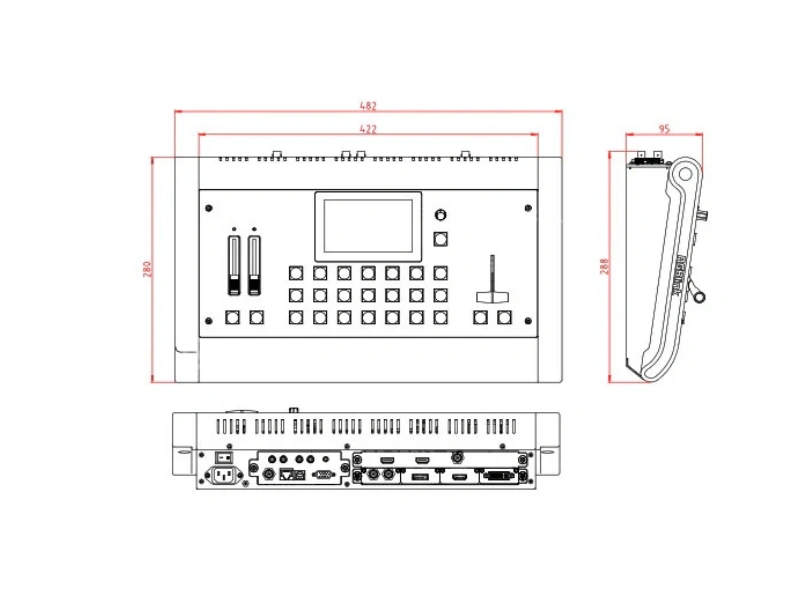
M1 Buying Guide: 5 Checks Before You Order
- Pick the input set, then the carrier. Four single-port modules cover most shows; single-port cards need the EXT module — order them together, and add the NDI module only with its MONE EXT MB Suite.
- Choose the output card by destination. HDMI-only shows take the standard card; broadcast chains want the SDI program; streaming rigs benefit from the USB 3.0 output that follows HDMI.
- Count the layers you actually use. Two video layers plus OSD/LOGO/STILL cover PIP, keying and logo work; if the show needs 16-window splicing, that is an X2 job, not an M1 job.
- Plan Genlock when cameras are involved. The BNC Genlock Y input locks the M1 to house sync — wire it whenever the wall or recorder shares a clock with cameras.
- Verify remote-control needs. XPOSE app control and USB-disk presets cover operators and volunteers; Tally DB15 matters when the M1 feeds a multi-camera chain.
Price and Cost Factors
M1 pricing follows the module set: chassis variant (M1 / M1 HDMI / M1 DVI / M1 HDMI+SDI) plus input, output, EXT and NDI modules. Send our team the source list and destinations and we quote the exact configuration with order codes — including the wing sides for rack installations.
RGBlink M1 Multi-Window Processor FAQ
Q1 What is the RGBlink M1 multi-window processor?
The M1 is a vision-mixer-style multi-window processor with up to four user-fit modular inputs, two full video layers plus OSD/LOGO/STILL layers, PIP with DSK and mask effects, a dedicated multi-view preview, and T-bar/TAKE control over 14 transition effects — built for stages, conferences and small studios.
Q2 Which input modules does the M1 accept?
Single-port modules for HDMI, DVI-I (compatible with DVI/VGA/YPbPr/CVBS), 3G-SDI with loop-through, USB 2.0 with backup, and an NDI decode module (NDI|HX). Single-port modules pair with the EXT module carrier, and one EXT module supports up to four single-port input modules.
Q3 Can the M1 decode NDI sources?
Yes, with the optional single NDI input module (order code 290-0001-10-0), which decodes NDI|HX sources at 720p and 1080p up to 60 Hz over the LAN. Note that this module requires the MONE EXT MB Suite to operate.
Q4 How many layers does the M1 composite?
The M1 composites two full video layers, plus additional layers for OSD, LOGO and STILL graphics. The foreground layer supports masks — built-in and user-defined — DSK/chroma key and variable edge blend, so overlays merge visually with the main picture.
Q5 What does the dedicated multi-view preview show?
The dedicated HDMI preview output shows PGM and PST next to all four input sources and audio levels on one screen. PPM monitoring can be displayed on the PVW, giving a single operator full picture-and-sound confidence during a show.
Q6 How does the T-bar workflow work?
The T-bar performs fader-style transitions between PST and PGM, while the TAKE button fires timed cuts. Fourteen transition effects are available across both methods, which is the familiar vision-mixer surface M1 operators expect.
Q7 Can the M1 output resolution differ from the input resolution?
Yes. Output resolution is set independently from input resolutions and scaled pixel-to-pixel by the processing engine — designed for direct connection to non-native displays such as LED walls with unusual canvas dimensions.
Q8 What audio facilities does the M1 include?
Both embedded and insert audio are supported with separate left and right level controls on the front panel. Audio can be selected independently from the video source, and the rear panel carries 2× RCA in, 2× RCA out and a 3.5mm stereo output for mixers or powered speakers.
Q9 Does the M1 support Genlock?
Yes. A Genlock Y input on BNC locks the M1 to an external sync source — the standard requirement when the wall, cameras or recorders share a house clock and every device must cut on the same frame boundary.
Q10 Can presets be saved and recalled on the M1?
Yes. Multiple presets can be saved and are additionally savable to an external USB disk, so a show’s layouts travel between units and venues — useful for rental fleets running identical configurations across inventory.
Q11 How is the M1 controlled remotely?
The XPOSE mobile app provides remote control, and the panel itself carries LAN (RJ45) and USB-B for software control. A Tally output on DB15 integrates the M1 into multi-camera tally chains.
Q12 How much does the RGBlink M1 cost?
Pricing depends on the chassis variant (M1, M1 HDMI, M1 DVI, M1 HDMI+SDI) and the input, output, EXT and NDI module set. Contact our team with the source list and destinations for a factory-direct quote with exact order codes.
The RGBlink M1, Delivered as an Operator-Ready Console
RGBlink M1 gives presenters and small crews a real mixing surface with modular inputs, layered compositing and a preview that shows everything at once — backed by Excelled’s pre-shipment testing and factory-direct support. Pair it with our LED screens and PTZ cameras for a complete stage package.
Related reading: RGBlink mini-pro streaming switcher · RGBlink X2 modular video wall processor · RGBlink Mini ISO all-in-one switcher · LED video processor guide · Request a quote